













Integrations
Integrations that connect every tool to the revenue it creates
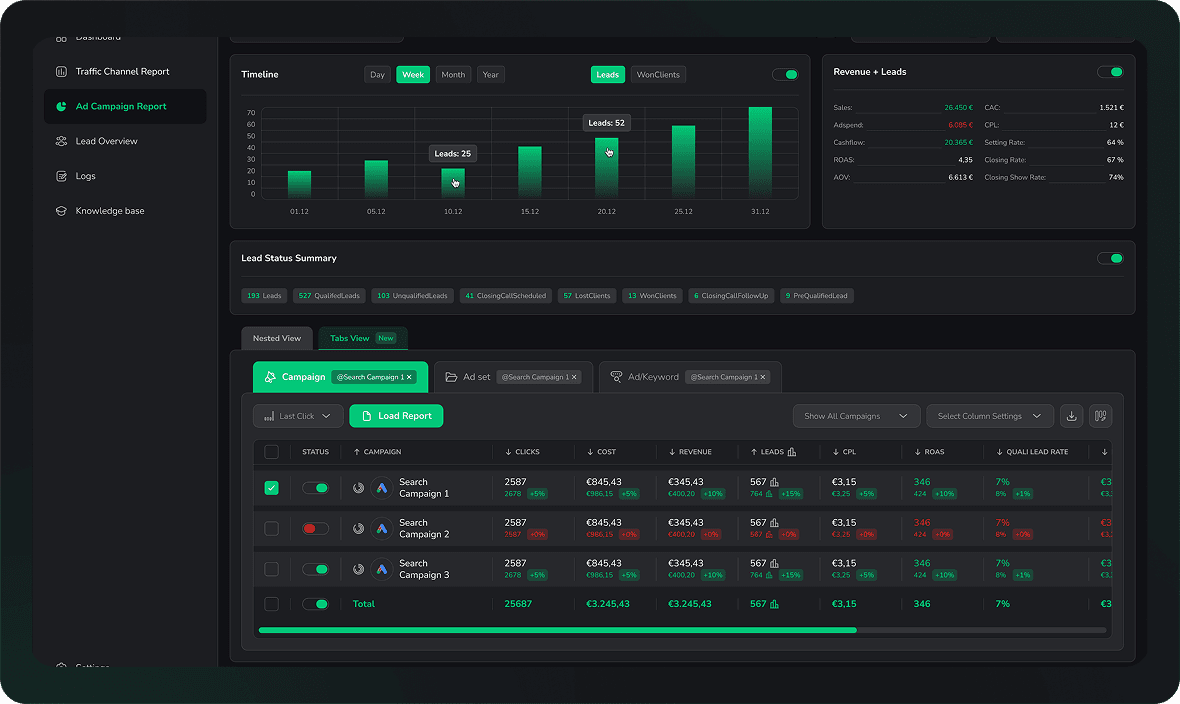
Ad platforms, CRMs, payment providers, websites, AI search engines and booking tools. Every click, lead and closed deal lands in one dashboard.


Spend, campaign structure and click IDs come in. Closed deals go back out as offline conversions.

Meta Ads
Facebook and Instagram spend in, Conversions API events back out.

Google Ads
Spend, clicks and conversions in real time, down to the keyword.

LinkedIn Ads
Pipeline and revenue by campaign, account and job title.

Microsoft Bing Ads
Bing, Edge, Yahoo and Copilot ads in one connection.

TikTok Ads
SoonSpend and conversion events for paid TikTok campaigns.

Pinterest Ads
SoonSpend and conversion events for paid Pinterest campaigns.

Reddit Ads
SoonSpend and conversion events for paid Reddit campaigns.

X Ads
SoonSpend and conversion events for promoted posts on X.

ChatGPT Ads
SoonAttribution for ads inside ChatGPT, ready at launch.
Lead stage and deal value flow in. Every campaign sees the revenue it actually produced.

HubSpot
Deal stages, qualified leads and closed won revenue by webhook.

Salesforce
Opportunity stages and closed revenue, through Flow or Apex.

Pipedrive
One click. Every record event fires the matching conversion.

Attio
Connect in one click, no Zapier and no developer needed.

Close
Every won opportunity stitched back to the original ad click.

GoHighLevel
OAuth in five minutes. Contacts, opportunities, invoices and orders.

ActiveCampaign
Contacts, accounts and won deals synced back to every campaign.

Odoo
Leads, opportunities and won revenue out of your Odoo CRM.

Patch Retention
Orders and repeat revenue tied back to the first touch.

Podium
Leads, conversations and collected payments attributed to their source.

monday.com
SoonBoard items and deal stages back to the campaign that started them.
The charge is the ground truth. Every payment and order is attributed to the campaign that produced the customer.

Stripe
Payments, subscriptions and invoices matched to their first ad click.

Shopify
Orders and customers attributed to the campaign that brought them.

Mollie
SoonPayments and subscriptions attributed to the campaign that paid for them.
The traffic your analytics still files under direct. No setup, the tracking script separates it.
ChatGPT
OpenAI referrals reported as their own source, never as direct.

Perplexity
Perplexity referrals with full attribution, nothing to configure.

Claude
Anthropic referrals appear as a separate source in every report.

Gemini
Split out from Google organic and attributed on its own.

Copilot
Microsoft Copilot traffic separated from Bing and from direct.

Grok
Traffic from X and grok.com tracked as its own source.

DeepSeek
DeepSeek referrals reported as their own channel.
Unpaid clicks from search and social, attributed per post, per video and per keyword.

Google
Organic search leads as a distinct source, no Search Console.
Bing
Organic Bing leads by channel, without Webmaster Tools.
LinkedIn
Posts, articles and profile clicks, broken down by UTM.

Facebook
Organic posts, pages and profiles, split by campaign.

Instagram
Bio links, Stories, Reels and posts, broken down by content.

YouTube
Descriptions, channel page and pinned comments, per video.
TikTok
Bio links and video links, down to the individual video.
One snippet in the site header. Every form on the site starts reporting its true source.
Any form on the site reports through the tracking script. These two also connect natively, submission by submission.

A booked call is the conversion that matters. Each one is matched back to its ad click.
Cal.com
SoonBookings, reschedules, payments and no-shows as conversions.

Calendly
Every booking, cancel and no-show matched to its ad click.
Phone calls are conversions too. Every tracked call is matched to the campaign that made the phone ring.

Registrations and attendance as conversions, attributed to the source that filled the room.
For everything with no native app. If a tool can send a webhook, LeadJourney can read it.
Webhooks and API
Send or receive data from virtually any tool you run.

Zapier
Thousands of apps without writing a line of code.

Make
SoonVisual scenarios that push events into LeadJourney.

n8n
SoonSelf hosted workflows, connected over the same webhook.
Where the raw attributed dataset goes when your team would rather query it themselves.

Google BigQuery
Clicks, conversions and leads streaming into your own dataset.

Looker Studio
Reads the exported BigQuery dataset, or a Sheet, natively.
Power BI
Reads the exported BigQuery dataset with its own connector.

Tableau
Reads the exported BigQuery dataset, live or as an extract.

Snowflake
SoonThe same export into Snowflake, on the roadmap.
Where the numbers land once they are calculated. Scheduled by the AI agents, no login needed.
Anything else
Your tool is not on the list
LeadJourney runs on webhooks and an open API, so anything that can send or receive data connects. Most custom setups are one endpoint and a field mapping, and our team walks you through it on the demo call.
Inbound webhook
Post a lead, a stage change or a payment from any system, and it is attributed like a native app.
Outbound webhook
Push the attributed lead, its source and its revenue into whatever you run downstream.
Setup
Three steps, whatever you connect
The same path for every tool on this page. No developer, no server to run, no tag manager archaeology. 21 minutes end to end.
- 15 minutes
Add the tracking script
One snippet in the site header. WordPress, Webflow, Wix and every page builder in between, then every form on the site reports its true source.
- 210 minutes
Connect your accounts
Sign in to your ad accounts and your CRM. Spend and campaign structure come in, and the lead stages you care about start flowing back.
- 36 minutes
Send the revenue back
Closed deals go to Meta, Google, LinkedIn and Microsoft as offline conversions, so the platforms optimise on revenue instead of form fills.
Questions
What people ask before connecting
The five that come up on nearly every demo call.
Which ad platforms does LeadJourney integrate with?
Meta Ads, Google Ads, LinkedIn Ads and Microsoft Bing Ads, which also covers Bing, Edge, Yahoo and Copilot placements. Spend, clicks and conversions land in one dashboard, and closed deals go back out to each platform as offline conversions by API.
How does the CRM integration work?
HubSpot, Salesforce, Pipedrive, Attio, Close and GoHighLevel connect natively, and any other CRM connects by webhook. When a lead moves through your pipeline or closes as a deal, the revenue syncs back to LeadJourney and is attributed to the campaign, channel or keyword that generated the lead.
Do I need a developer to set the integrations up?
No. You connect your ad accounts, add a small tracking script to your site and point your CRM webhook at LeadJourney. No code and no server setup, and most accounts are reporting inside 21 minutes.
Can I track leads from forms, calendars and scheduling tools?
Yes. LeadJourney captures leads from any form builder, and Cal.com and Calendly booking events come through as conversions, including reschedules and no-shows. Every lead is matched to the traffic source that brought it in.
What if my tool is not listed yet?
LeadJourney works with webhooks and an open API, so virtually any tool that can send or receive data connects. If you need a custom setup, our team walks you through it on the demo call.
Connect your stack
See which campaigns your CRM revenue came from
Connect your ad accounts and your CRM, and the first attributed revenue shows up the same day. 95%+ accuracy, first-party required.