
















HubSpot integration
HubSpot attribution, wired in minutes, from first touch to closed won
LeadJourney writes the full journey onto your Contacts, Companies and Deals, then sends closed won revenue back to Meta, Google and LinkedIn.
- Live in 21 minutes
- 95%+ accuracy, first-party
- No developer required
Rated by the teams who connected their stack
How the data moves
- Touchpoints and spend flowing in
- Deals and revenue going back
Meta and Google see the click. HubSpot sees the deal. Neither one sees the other. LeadJourney sits in between and joins the two, in both directions.
- Organic search
- Organic social
- AI search
AI Attribution Engine
LeadJourneyServer-side tracking, every channel in one journey- Server-side tracking of every visit
- Multi-touch attribution per contact
- Closed won revenue back to the ad account
HubSpotWhere the revenue is recorded- Contacts
- Companies
- Deals
The loop closes in the ad account. Every deal HubSpot marks closed won goes back to the platform that created it, so bidding optimises on revenue instead of form fills.
Trusted by 100+ lead generation businesses, agencies and freelancers
Traffic channels
Connect your channels to HubSpot
Every ad platform's spend, campaigns and click IDs land in the same journey HubSpot records, so pipeline and revenue sit in one place.
 Paid search
Connect Google Ads to HubSpot
Every gclid is captured server-side and followed from the first ad click to the closed won deal, with spend pulled in for live ROAS.
View integration Social ads
Connect Meta Ads to HubSpot
Facebook and Instagram campaigns are tracked past the pixel's limits, and closed won deals go back through the Conversions API with the deal amount attached.
View integration Social ads
Connect LinkedIn Ads to HubSpot
Paid and organic LinkedIn touches land on the Contact, so B2B campaigns are judged on the deals they start rather than on form fills.
View integration Paid search
Connect Microsoft Ads to HubSpot
Clicks from Bing, Edge and Copilot are matched on msclkid and attributed to the HubSpot revenue they produce.
View integration
 TikTok Ads
 Pinterest Ads
 Reddit Ads
 X Ads
X Ads ChatGPT Ads
HubSpot and LeadJourney
HubSpot attributes what its own cookie recorded
The reports are good and the models are thorough. They start with the first session HubSpot's tracking code saw, and that is where the six gaps below open up.
What HubSpot's own attribution already does, and does well
- Nine attribution models, from first and last interaction through U shaped, W shaped, full path, time decay and both J shapes.
- A wide set of interactions: ad clicks, page views, forms, CTAs, marketing emails, social clicks, events, calls, meetings and conversations.
- An ads tool that connects Meta, Google, LinkedIn and TikTok and pulls their spend into HubSpot.
- Conversion events back out through Meta's and LinkedIn's Conversions APIs and Google's Enhanced Conversions for Leads.
- AI Referrals as a traffic source of its own, covering ChatGPT, Claude, Perplexity, Gemini and Copilot.
- Campaign reporting, contact create attribution and, on Enterprise, deal create and revenue attribution.
HubSpot attribution on its own
Thorough about the sessions its cookie recorded
HubSpot with LeadJourney
One journey per contact, joined to spend and to closed won revenue
Every touchpoint
The whole journey into HubSpot, and the closed deal back to the ads
Marketing sees every touch before and after HubSpot, sales sees the source on the record it opens, and the won amount goes back to the platform.
See every journey in LeadJourney
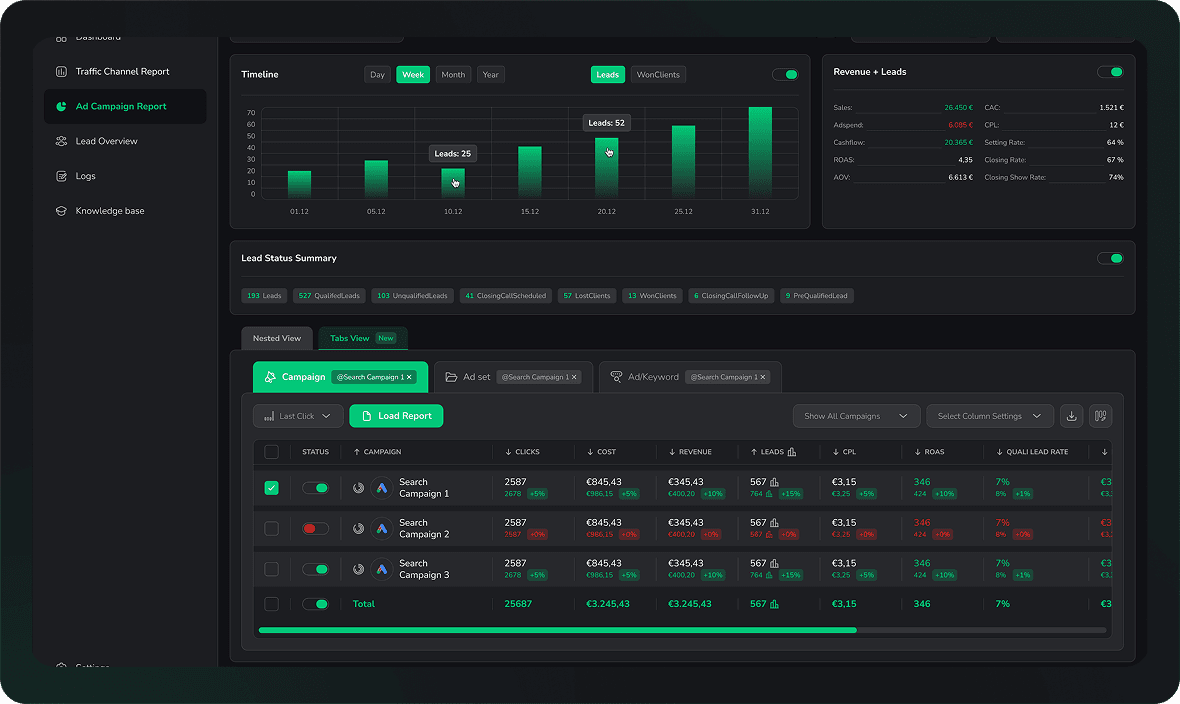
The dashboard marketing runs on
- Every touchpoint of every lead in one timeline, from the first anonymous click to the deal HubSpot marks won.
- First touch, last touch and every model in between, so a LinkedIn first click and a Google brand-search close are one journey, not two leads.
- Filter any campaign, ad or landing page to the leads it produced and the deal stage each one reached.
- The same journey written onto the Contact and the Deal in HubSpot, so your team sees where a lead came from before the first call.
Send it back to the ad platforms
Where the bidding learns from revenue
- A deal HubSpot marks won becomes a conversion on Meta, Google Ads, LinkedIn and Microsoft, matched on the click ID captured at the first visit.
- The deal amount travels with the event, so value based bidding optimises on revenue rather than on form fills.
- You choose which stages go back: qualified lead, opportunity, won, or all three.
- Sent server to server, so there is nothing for an ad blocker or a declined cookie banner to remove.
How it works
HubSpot data in, attributed revenue back out
Both directions run on their own once connected: one makes cross-channel attribution possible, the other puts the answer on the record your team already works in.
1 Pull your pipeline into LeadJourney
Your HubSpot data meets the marketing data it was always missing.
LeadJourney reads your Contacts, Companies and Deals by webhook, with lifecycle stage, deal stage, amount and close date.

Ad clicks, spend, sessions, forms and click IDs are tracked server-side across paid, organic and AI search.
LeadJourney joins the two into one journey per contact, from the first anonymous click through to the deal HubSpot closed.
Influenced pipeline, attributed revenue, ROAS and cost per closed won deal, per channel, campaign and ad.
2 Write the HubSpot attribution back onto every record
So nobody opens a second tool to answer where a deal came from.
LeadJourney writes the finished attribution onto the HubSpot record, only into the properties you mapped.
First touch, last touch, campaign, ad and click ID land as properties on the Contact, the Company and the Deal.
Reports, lists and workflows pick them up like any other property: route by source, or alert sales the moment a paid lead arrives.
Sales sees where the contact came from on the record they already work in, and marketing sees the deal amount against the ad.
The return path
Closed won HubSpot revenue, back in the ad account that earned it
A form fill is not a result. When HubSpot marks a deal closed won, the amount goes back to the platform that produced the click.
- MetaConversions API
Qualified lead, deal created and closed won, with amount and currency
- Google AdsOffline conversion import
Conversions matched on gclid, with the deal amount for value based bidding
- LinkedIn AdsConversions API
Lifecycle and deal stage changes and won revenue matched on li_fat_id
- Microsoft AdsOffline conversions
Conversions matched on msclkid, with the deal amount
- TikTok AdsEvents API
Server-side lead and revenue events
You choose what counts as a conversion
Map any HubSpot lifecycle stage or deal stage to any platform event. Sales qualified, contract sent, closed won, or all three.
Value based bidding gets the real deal amount
The amount travels with the event, so tROAS strategies optimise on pipeline instead of a fixed value per stage.
Sent server to server
No pixel to fire, nothing for an ad blocker or a declined cookie banner to remove.
Reporting
The questions your HubSpot reports cannot answer yet
Each of these is a report, not a custom report project. HubSpot stays the source of truth for the deal, LeadJourney for the source behind it.
Which campaign produced the deals we closed last quarter, not just the contacts?
What did a closed won deal actually cost us in ad spend, per channel?
Which channel starts our biggest deals, even when a different one closes them?
How much closed won revenue came from ChatGPT, Perplexity and Gemini last month?
Which landing page produces the contacts that reach sales qualified?
Which campaigns buy contacts that never leave the lead lifecycle stage?
MCP server
Chat with your HubSpot attribution data
The same journeys, spend and revenue are also served over MCP. Ask in Claude or ChatGPT and the answer comes from your own numbers.
LeadJourney MCP connected, try any tab
Which campaigns produced our closed revenue last month?
Based on your LeadJourney data, 3 campaigns produced 148,200 EUR of closed revenue last month:
- Google Ads, Brand
- 38 leads, 9 closed deals, 61,400 EUR. Shortest path to signature.
- LinkedIn, Retargeting
- 21 leads, 6 closed deals, 48,900 EUR. Seven touchpoints on average.
- Meta, Lookalike DACH
- 54 leads, 5 closed deals, 37,900 EUR. Cheapest qualified lead.
Want this as a weekly summary in Slack?
Ask anything about your lead journeys
Where did our three biggest deals this quarter come from?
Your 3 largest deals this quarter all started somewhere the last click never showed you:
- 42,000 EUR
- First touch LinkedIn Ads, closed 63 days later after a webinar signup.
- 28,500 EUR
- First touch Google organic, paid click on day 11, demo on day 19.
- 21,800 EUR
- First touch a Meta video view, form filled from email six weeks on.
Want the full touchpoint list for any of them?
Ask anything about your closed deals
Which landing pages turn LinkedIn traffic into qualified leads?
3 pages take your LinkedIn traffic, and the qualified rate between them runs from 4% to 18%:
- /demo/attribution
- 18% qualified from 214 visits. Highest intent page on the site.
- /guide/server-side
- 9% qualified from 612 visits. Most journeys stall after the download.
- /pricing
- 4% qualified from 488 visits. Second most traffic, lowest intent.
Want the same breakdown for Google Ads traffic?
Ask anything about your landing pages
What did each channel cost per qualified lead last week?
3 channels spent budget last week. Cost per qualified lead ran from 41 EUR to 187 EUR:
- LinkedIn Ads
- 41 EUR per qualified lead. 2,300 EUR spent, 56 qualified.
- Google Ads
- 88 EUR per qualified lead. 4,400 EUR spent, 50 qualified.
- Meta Ads
- 187 EUR per qualified lead. 3,740 EUR spent, 20 qualified.
Want an alert the moment a channel passes 120 EUR?
Ask anything about your cost per lead
What do the journeys that close have in common?
3 signals show up in most of your closed deals and in almost none of the lost ones:
- Pricing page, 2+ visits
- In 71% of closed deals. In 12% of the ones that never closed.
- Demo within 14 days
- In 64% of closed deals. Median 9 days from the first click.
- Second contact
- In 58% of closed deals. A colleague of the lead arrives on site.
Want these three scored onto every lead in your CRM?
Ask anything about your lead journeys
Setup
Connected to HubSpot in about 21 minutes
No developer, no data warehouse and no implementation partner.
- 1About 5 minutes
Add a single line of code to your website
Paste the LeadJourney script into your site or your GTM container. It starts recording sessions, click IDs and form fills immediately.
- 2About 10 minutes
Connect HubSpot and your ad accounts
Sign in to HubSpot over OAuth and pick the objects and properties in scope, then link Meta, Google, LinkedIn and Microsoft Ads. Spend and campaigns are imported for you, historic data included.
- 3Same day
Map stages to conversion events
Choose which lifecycle and deal stages count as a qualified lead and which count as revenue. From then on every closed won deal flows back to the platform that created it, with the amount attached.
Original reviews
What our customers wrote, word for word
4.9 out of 5 across 11 public reviews. Quoted as they were left, shortened only by dropping whole sentences.
- 5 out of 5 starsGoogle
“Before LeadJourney, we had no reliable tracking concept for our five-figure ad spend. We were manually building spreadsheet and CRM reports, inaccurate and time-consuming. Within two days, everything was set up. For the first time, I know exactly what I pay per lead and which campaigns actually bring in the best-qualified prospects.”
 Florian BuckCEO, Klickkraft GmbH
 “With LeadJourney we are able to track all our leads and connect them with sales and attribution data to make better decisions. In the first month of using it we scaled from 0 to 100k revenue from paid ads only.”
 GetreachBacklinks Marketplace (SaaS)
- 5 out of 5 starsG2
“LeadJourney finally fixed my Marketing Analytics. It goes way beyond basic Ad Tracking Software. The Customer Journey Report saves hours of digging, and capturing everything from Offline Conversions to AI Search Tracking makes it the Best B2B Attribution Platform available.”
Sascha LenzMarketing Manager
- 5 out of 5 starsTrustpilot
“Connected LeadJourney for 2 clients, setup took literally 20 minutes each. The data became more accurate, the reports actually make sense. Now clients look at the dashboard and the 'why don't the numbers match?' questions are gone.”
 Alexander SamarPerformance Marketing Agency
 - 5 out of 5 starsGoogle
“With LeadJourney, we have finally found a tool that provides us with the data we need to scale our performance marketing campaigns. The most important KPI is no longer lead price but cost per qualified lead.”
 Steffen SiesingCEO, Bilanzmanufaktur GmbH
- 5 out of 5 starsG2
“The ability to track both online and offline conversions in one unified dashboard has given us insights we never had before. Our ROI has improved dramatically since we started integrating LeadJourney with our CRM. We're finally able to see the full customer journey, and it's been a game changer for our strategy.”
 Andre WitzelFounder, Trading.de
 - 5 out of 5 starsTrustpilot
“The ability to seamlessly integrate data from multiple channels and see real-time insights has significantly improved our campaign results. We now focus on metrics that truly matter, like ROI and qualified leads.”
 Nikita YatsunCEO, RLV Media GmbH
Read the reviews where they were left
FAQ
What HubSpot admins ask before connecting
If yours is not here, our team answers in the chat within a few minutes.
How is this different from HubSpot's attribution reports?
HubSpot's reports divide credit between the interactions its own tracking cookie recorded, and they start with the first session that cookie saw. LeadJourney produces the touchpoints in the first place: it tracks every visit server-side, including the ones an ad blocker or a declined banner would have removed, joins them to spend from every ad account, and writes the result onto your Contacts, Companies and Deals. The two work together, and HubSpot's reports get better data to divide.
Do I need Marketing Hub Enterprise for HubSpot attribution?
No. LeadJourney runs its own attribution on tracked events and writes the result onto your records as properties, so it works the same on Starter, Professional and Enterprise, and with Sales Hub alone. If you do licence revenue attribution reports, keep using them: they simply have more to work with.
Which properties does LeadJourney write into HubSpot?
On the Contact: first and last touch channel, source and campaign, the ad, ad set and creative, every UTM parameter, the click ID from each platform, the landing page and referrer, and a link to the full journey. On the Deal: the attributed channel and campaign, the credit each touchpoint earned under your active model, and the ad spend attributed to the deal. You choose which of those are in scope before anything is written.
Will it overwrite Original source or other properties my team relies on?
No. Nothing is written to a property you have not mapped, and the direction of every mapping is yours to set. Most teams write attribution to the dedicated LeadJourney properties and leave Original source, Latest source and their own fields untouched, so historic reporting stays comparable.
How does LeadJourney read deal stages out of HubSpot?
By webhook. When a lifecycle stage, deal stage or amount changes, HubSpot notifies LeadJourney and the journey updates, so a deal marked closed won reaches your ad platforms as it happens rather than in a nightly batch. Transparent Logs show every record that moved and when.
Can I send closed won deals back to Meta and Google?
Yes, and it is the point of the integration. Closed won deals are sent to Meta through the Conversions API, to Google Ads as an offline conversion import matched on gclid, to LinkedIn through the Conversions API and to Microsoft Ads matched on msclkid, with the deal amount attached so value based bidding has a real number to optimise against.
Does it work with multiple pipelines and custom properties?
Yes. The sync is mapped per object and per property, so it works with every pipeline and its own stages, with custom properties on Contacts, Companies and Deals, and with multiple currencies. You decide per pipeline which stages count as conversions.
A deal closes three months after the first click. Is it still attributed?
Yes. The journey in LeadJourney has no attribution window, so the deal is credited to the campaign and ad that started it however long the sales cycle takes. The ad platforms apply their own windows to the events they receive, so a late deal mainly improves their optimisation; the report that matches revenue to the ad lives in LeadJourney and on the HubSpot record.
Do I need a developer or a HubSpot admin?
No developer. Connecting HubSpot is an OAuth sign in and a property mapping screen, and most accounts are live in about 21 minutes. An admin is useful for deciding which properties to expose, and our team will do the mapping with you on a call if you prefer.
Is the HubSpot sync GDPR compliant?
Yes. Data is processed and stored in the EU, we sign a data processing agreement, and tracking runs first-party and server-side so it respects consent decisions rather than working around them. Financial, legal and other regulated industries are a core part of our customer base.
What does it cost?
The HubSpot integration is part of the platform rather than a paid add on. Plans are priced on tracked events instead of seats, so your whole team and your agency can share one workspace, and every plan starts with a 14 day free trial without a credit card.
More integrations
More CRM and sales integrations
Connected the same way, attributed in the same dashboard. The rest of your stack reports right next to this one.


95%+ accuracy, in and out of HubSpot
Start linking marketing to revenue in HubSpot with LeadJourney
Connect HubSpot and watch your own deals line up against the campaigns that created them, stage by stage.