


















BlogB2B Marketing Attribution
X Ads vs Meta Ads: How Each Counts a Conversion, Compared
X and Meta both report conversions, and the numbers are not the same kind of number. X credits a conversion up to 30 days after a like or a reply by default; Meta counts link clicks for 7 days. A sourced comparison of windows, server events, lead forms and CRM stages, and how to judge the two channels on the same closed revenue.

Contents
Summarise this article with AI
Opens the page with a ready prompt in:


Nothing is sent until you pick a service.
Put X Ads (formerly Twitter Ads) and Meta Ads side by side in a spreadsheet and one usually looks cheaper per conversion. Before that decides a budget, check what each platform called a conversion. They do not mean the same thing, and on X the difference is large: by default a like, a repost or a reply opens a 30-day window, where Meta's click-through counts only link clicks, for up to 7 days.
This comparison sticks to what both platforms document: how they attribute, how they take server events, what they do with lead forms and CRM stages, and what that means for comparing them fairly. It does not tell you which one is cheaper for your business, because no published benchmark from either could, and it ends with the test that can.
Quick Summary: X Ads vs Meta Ads
In short
Both platforms run a browser pixel, a server-side Conversions API that deduplicates against it, a click ID on the landing URL (twclid on X, fbclid on Meta) and a native lead form. The biggest difference is what counts: X credits a website conversion up to 30 days after any engagement with the ad and 1 day after a view by default, while Meta's default is 7 days after a link click, 1 day after a view and 1 day after another engagement. Meta also documents a program for optimising on CRM stages (Conversion Leads) and an incremental attribution model; X documents its Conversions API for conversions that finish offline but no CRM stage program. So neither dashboard's CPA can be compared with the other's. Judge both on the same thing: clicks joined to closed revenue in your CRM.
The rest is the detail, platform by platform, with what each documents and what it does not.
X Ads and Meta Ads Measurement, Side by Side
The parts are the same on both platforms. The rules around them are not.
How X Ads and Meta Ads measure a website conversion, as each documents it
| What | X Ads | Meta Ads |
|---|---|---|
| Browser tag | X Pixel, base code plus event code | Meta Pixel |
| Server events | X Conversions API, up to 500 events per request | Meta Conversions API |
| Click ID on the landing URL | twclid | fbclid, kept in the _fbc cookie |
| Deduplication | Same Event ID plus the same conversion_id | Same event_id plus event_name |
| Default click credit | 30 days after any engagement: like, repost, follow, reply or link click | 7 days after a link click |
| Other engagement | Included in the 30-day post-engagement window | 1 day, engage-through (non-link click or 5 seconds of video) |
| Default view credit | 1 day, adjustable up to 30 | 1 day, or none |
| Where windows are set | Per event, in Events Manager, retroactive | In the campaign's attribution setting |
| Oldest server event accepted | Not documented | 7 days; older and the whole request is refused |
| CRM stage program | None documented | Conversion Leads integration |
| Incremental attribution | Not part of X's conversion tracking docs | Optional model for Sales, Engagement and Leads |
| Native lead form | Lead Gen Ads, exported as files | Lead ads with instant forms |
None of these rows makes one platform better. They make the two dashboards incomparable, which is the point to take into a budget meeting.
The Biggest Difference: What Counts as a Conversion
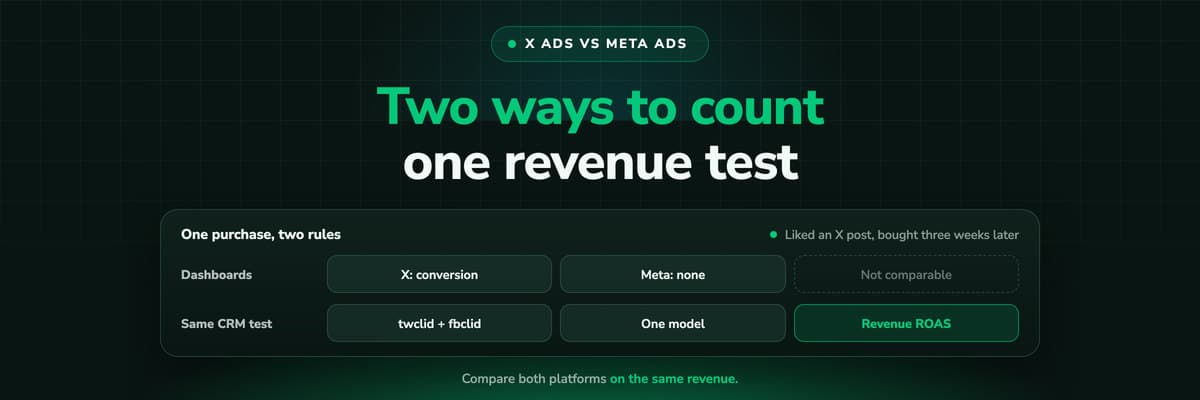
Take one person and one purchase to see how far apart the two rules are. They saw an ad on each platform, liked the X post, and three weeks later searched your brand and bought.
X, default settings
The like opened a 30-day post-engagement window. The purchase three weeks later is an X conversion.
Meta, default settings
No link click, and the view was more than a day earlier. The purchase is not a Meta conversion.
Your CRM
One customer, who arrived through a branded search. Neither ad has a click on the record.
Meta moved in the other direction this year: on 3 March 2026 it narrowed click-through to link clicks for website conversions and moved other actions into a separate engage-through credit of 1 day. X's post-engagement window still counts a reply or a follow like a click. Both are legitimate choices. They just answer different questions, and the X one is the more generous of the two.
Make the windows comparable before you compare
If you must compare dashboards, set X's post-engagement window to 7 days on the event you compare, and read Meta's 7-day click column. It is still not like for like, because an X engagement is not only a link click. Better to compare both on clicks you tracked yourself.
Server-Side Events: The Two Conversions APIs
Both platforms want the browser tag and a server copy of the same event, deduplicated on a shared ID. The differences are in access and in timing.
- AccessX's own guide says a custom integration needs a developer account, Ads API access and OAuth 1.0a tokens. Through server-side Google Tag Manager, an access token generated in Events Manager is enough, with X's official template.
- How late an event may arriveMeta refuses a request containing an event older than 7 days. We found no X page stating a limit on conversion_time; the attribution window still decides whether a late event is credited.
- IdentifiersX matches on twclid, hashed email and hashed phone, with IP address and user agent only alongside one of them. Meta takes the fbclid in _fbc plus hashed customer details.
- PartnersX names Adobe, Tealium, MetaRouter, Datahash and RudderStack as Conversions API partners, and its Shopify app installs the Pixel in one click.
The setup guides for each side: the X Conversions API and the Meta Conversions API for lead generation.
Click IDs: twclid and fbclid
Both platforms append a click ID to the landing page URL on an ad click, and both pixels pick it up by themselves. Everything outside the pixel, the server event and the CRM record, depends on you keeping it.
- twclid on XAppended automatically. The X Pixel passes it from the URL or a first-party cookie, and X recommends always including it in Conversions API requests. Redirects strip it, X says, so link straight to the page.
- fbclid on MetaKept in the _fbc cookie, and Meta documents how to build that value from the fbclid when no cookie exists, so a server event can still carry it.
- On the lead recordNeither CRM sees either ID unless your form hands it over in a hidden field. Without it, nothing downstream can join the deal to the click.
Keep both the same way: save them when the visitor lands, carry them to whichever page holds the form, and store each in a property of its own. The X Ads UTM guide covers the tagging that sits next to them.
Sending CRM Stages Back: Meta Has a Program, X Has the API
For lead generation this is the part that changes cost per customer: telling the platform which leads became qualified leads and deals, so it looks for more of those.
Optimising on CRM stages, as each platform documents it
| What | X Ads | Meta Ads |
|---|---|---|
| Documented route | The Conversions API, for conversions that "start online, but finish offline" | The Conversion Leads integration, through the Conversions API |
| Which events | The documented event types, for example Lead and Purchase | CRM stages you define |
| Key to match on | twclid, hashed email or phone | The Meta Lead ID stored in the CRM, plus customer details |
| Published requirements | None for CRM stages | Upload at least daily, stage within 28 days of the lead, 200 leads a month, a 1% to 40% conversion rate |
On X, sending a qualified lead back works the way any server event does: send it as Lead (or a won deal as Purchase with its value) with the twclid you kept, and X credits it if it falls inside the event's window. X publishes no stage ladder or volume guidance, so how you map stages to events is your design. The X lead generation guide has two ladders, and sending CRM data back to Meta and Google covers Meta's side.
Native Lead Forms on Both Platforms
Both platforms now let a person submit their details without leaving the app. X Lead Gen Ads collect contact information in a native form, pre-filled after the first submission, and the leads come out as JSON, CSV or XLSX exports run by account administrators. Meta's lead ads use instant forms, which tools such as Zapier and LeadsBridge sync into CRMs, and Meta's Conversion Leads integration is built around the lead ID they carry.
The measurement consequence is the same on both: a form inside the app never loads your site, so there is no pixel event and no click ID, and the lead's source is whatever the import sets. HubSpot's ads tool, for example, connects Meta, Google, LinkedIn, Microsoft and TikTok accounts and not X, so an X form lead needs its source set on import by hand or by your own pipe.
Objectives, Buying and What We Did Not Compare
X's help center lists Reach, Video Views, Pre-Roll Views, App Installs, Engagement and Website Traffic, plus the Sales objective (formerly website conversions), which needs the Pixel or the Conversions API and at least one conversion event; X recommends Autobid and paying by impressions there, and says there is no minimum campaign spend. Meta's incremental attribution, for comparison, is offered on the Sales, Engagement and Leads objectives. The Ads API's documented objective list on X has no lead objective yet, although the native forms exist.
What this post does not compare: audience targeting, reach and cost. X describes its audience in its own words, Meta in its own, and neither publishes a CPM or CPC benchmark that would let anybody say which is cheaper for your offer. A comparison of costs from somebody else's account says nothing about yours, so the next section is the test that does.
How to Compare X and Meta Fairly
The only comparison that holds is the one in which both platforms are measured by the same rule, outside both dashboards.
- Track clicks on both, on your own domain. twclid and fbclid on the visitor, UTMs on every ad, no redirects in the ad links. X warns that redirects strip twclid.
- Join the clicks to the CRM. Every lead carries its click IDs and UTMs; every deal carries its value.
- Pick one attribution model and apply it to both. First click, last click or a multi-touch model, stated beside the figure.
- Compare cost per qualified lead and revenue ROAS, not CPA from either dashboard.
- Read by click cohort once your typical time to close has passed, since both platforms finalise late and deals close later still.
Then send each platform the stages it can learn from, so both optimise on the same definition of a good lead. More in why GA4, Meta and Google never match your CRM and click-through vs view-through conversions.
Reading the Result: When Each Earns Its Budget
Once both are measured on the same revenue, the result usually falls into one of a few patterns.
What a side by side test usually shows, and what to do
| What you see | What it likely means | What to do |
|---|---|---|
| X's CPA looks cheaper, but its click revenue is lower | The engagement window is carrying X's number | Budget on click revenue, not on the dashboard CPA |
| One platform strong under first click, weak under last click | It opens journeys the other channels close | Keep it, and judge it on first-touch or position-based revenue |
| Both produce leads, one produces qualified leads | Lead quality differs by channel | Send the qualified stage back to both and shift budget to the better one |
| Native forms win on volume, lose in the CRM | Low friction brings low intent | Compare forms against your site on qualified leads, per platform |
| Neither returns revenue after the sales cycle | The offer, not the platform | Fix the offer and the page before moving money between platforms |
How LeadJourney Puts X and Meta on One Report
LeadJourney is one script on your site or in your GTM container, live in about 21 minutes, tracking server-side and first-party at 95%+ accuracy. On the first visit it issues the LeadJourney Click ID, its own visitor identifier kept for months, and every session is stored under it, with the platforms' click IDs as properties: twclid from X and fbclid from Meta, next to gclid, gbraid, wbraid, li_fat_id, msclkid and rdt_cid.
The X Ads integration and the Meta Ads integration sign in with OAuth and import campaigns, ad groups or ad sets, ads and daily spend. The lead is followed through HubSpot, Salesforce, Microsoft Dynamics 365, Zoho CRM, Pipedrive, Attio, Close, GoHighLevel, ActiveCampaign or Odoo, or to the Shopify or Stripe order. So cost per qualified lead and revenue ROAS for X and Meta sit on the same rows, under the same model, with no attribution window on our side.
The stages you map go back to each platform through its own Conversions API as they change: to X with twclid, hashed email and phone and a conversion_id that deduplicates against the X Pixel, to Meta with its click and customer data. The limits, plainly: we count clicks and visits, not likes, follows or views, and a lead from either platform's native form never visited your site. Tracking respects consent. Every plan starts with a 14-day free trial.
Further Reading
- X Ads conversion tracking and are X Ads worth it.
- X lead generation ads and the X Conversions API.
- Meta Conversions API for lead generation and Meta's incremental attribution setting.
- Click-through vs view-through conversions.
- Product: the X Ads integration, the Meta Ads integration and lead quality by channel.
- Definitions: view-through conversion, conversions API and click ID.
In the glossary
FAQ
Frequently Asked Questions
What marketers ask when they split a budget between X and Meta.
Is X Ads or Meta Ads better?
Neither in general. It depends on where your buyers pay attention and on your offer, and no benchmark from either platform settles it for your account. Track clicks from both on your own domain, join them to your CRM and compare cost per qualified lead and revenue ROAS under one attribution model.
Why is my X Ads CPA lower than my Meta CPA?
Often because the two count different things. X by default credits a website conversion up to 30 days after any engagement, a like, repost, follow or reply as well as a click, plus 1 day after a view. Meta's default is 7 days after a link click, 1 day after a view and 1 day after another engagement. A more generous window makes a cheaper CPA.
Do X Ads and Meta Ads both have a Conversions API?
Yes. Both take server events next to the browser pixel and deduplicate them: X on the same Event ID plus conversion_id, Meta on event_id plus event_name. Meta refuses events older than 7 days; we found no X page stating a limit on how old a conversion may be.
Can I send CRM stages to X like Meta's Conversion Leads?
X documents no program like Conversion Leads. Its Conversions API does take conversions that finish offline, so you can send a qualified lead as Lead or a won deal as Purchase with its value and the twclid you kept. X credits it if it falls inside the event's attribution window.
Do X and Meta both have lead forms?
Yes. X Lead Gen Ads collect contact details in a native form on X, exported as JSON, CSV or XLSX by account administrators. Meta's lead ads use instant forms, which more CRMs and sync tools connect to. On both, the lead never visits your site, so it carries no click ID.
Is Twitter advertising cheaper than Facebook?
Twitter Ads are now X Ads, and neither X nor Meta publishes CPM or CPC benchmarks that would answer it. Your own test, with both measured on the same closed revenue, is the only figure worth comparing.
Keep reading
More from the blog
 B2B Marketing Attribution
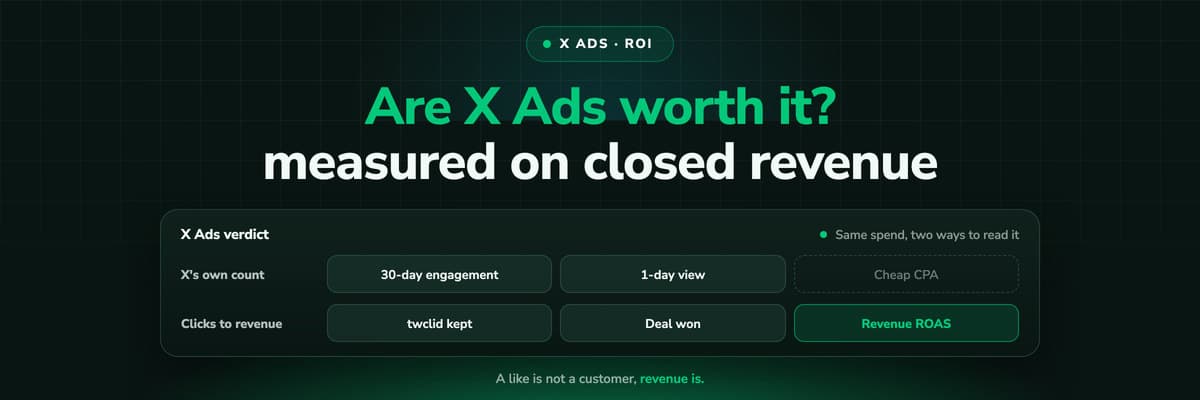
Are X Ads Worth It? Measuring X Ads ROI on Revenue
Whether X Ads are worth it depends on what you measure and on what you sell. How to calculate X Ads ROI and ROAS on closed revenue, what X's own conversion numbers include (a like a month before the purchase counts by default), what a fair test needs, and the traps that make X look better or worse than it is.Read the article16 min read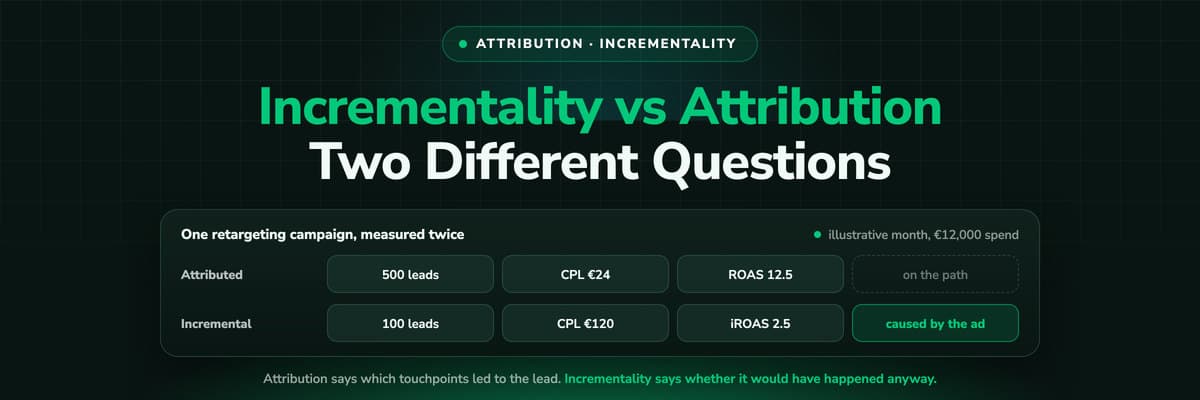 B2B Marketing Attribution
Incrementality vs Attribution: Which Question Each Answers
Attribution tells you which touchpoints led to a lead or a deal. Incrementality tells you whether it would have happened anyway. This guide works one retargeting campaign through both, shows where each belongs, and how to combine them when the outcome lives in your CRM.Read the article17 min read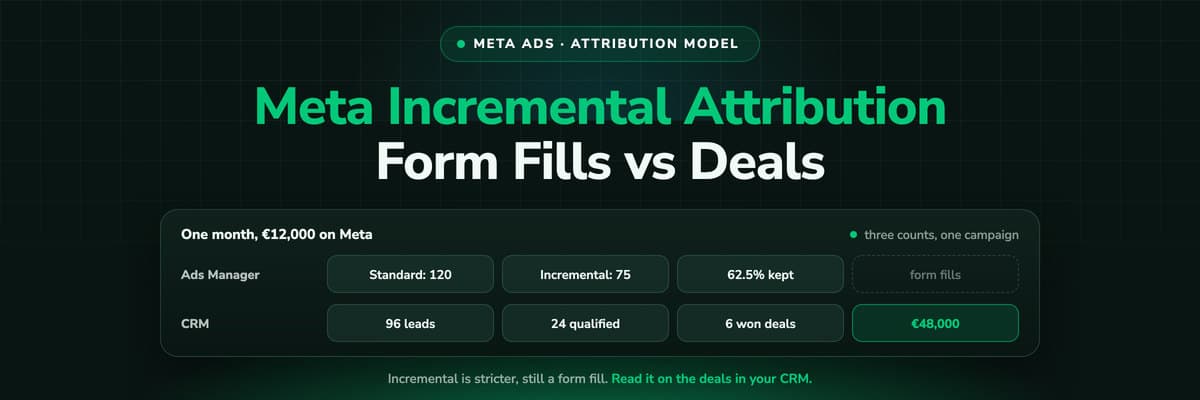 B2B Marketing Attribution
Meta Incremental Attribution: What It Counts for Lead Gen
Meta's incremental attribution model optimises and reports on the conversions its models predict an ad caused, not every conversion inside a window. This guide covers what Meta's own help pages say about it, how it differs from 7-day click 1-day view, why its numbers come out lower, what it cannot see in lead generation, and how to read it next to the deals in your CRM.Read the article17 min read
X vs Meta
Ready to compare X and Meta on real revenue?
LeadJourney captures twclid and fbclid server-side on every click, follows each lead to closed won and shows cost per qualified lead and ROAS for both on one report. Live in about 21 minutes, 14-day free trial.


