


















BlogHow To Guides
X Ads UTM Parameters: twclid, Naming and the GA4 Setup
X appends one parameter to your landing page by itself, the twclid click ID. Everything else you type, because X documents no URL macros. What twclid is and where it goes, how to tag a website card or a link in a post, a naming convention GA4 reads correctly, why X's conversion count and your UTM report never agree, and why UTMs on their own lose the X click long before the deal closes.


Contents
Summarise this article with AI
Opens the page with a ready prompt in:


Nothing is sent until you pick a service.
Tag a Google Ads campaign badly and auto-tagging quietly rescues you. X Ads (formerly Twitter Ads) has no such rescue for your analytics. It appends exactly one parameter to the landing page, its own click ID, and everything your analytics tool needs to call the visit X you have to type into the URL yourself. X documents no macros that would fill in the campaign or the ad for you, so every value is static and every ad needs its own.
This guide covers both halves of the URL. What twclid is and where it has to go, how to add UTM parameters to a website card or a link in a post, a naming convention that GA4's channel rules read correctly, why X's conversion count will not match a UTM report even when the tagging is perfect, and why UTMs on their own lose the X click long before the deal closes.
Quick Summary: UTM Parameters on X Ads
In short
X appends its click ID, twclid, to your landing page URL on every website click-through; the X Pixel reads it, and a Conversions API integration has to store it and send it back. UTM parameters are yours to add, typed into the URL of the website card or the link in the post. X documents no URL macros or dynamic parameters, so the values are static and written per ad. Use one lowercase source, a paid medium such as paid_social, and check in GA4 that the visits land in Paid Social. Redirects strip the twclid, and X says so. X also credits conversions after likes, reposts and replies that never produced a click, so its conversion count and your UTM report disagree by design, and UTMs alone lose the X click the moment the buyer comes back another way.
The rest of this guide is the detail behind each sentence of that paragraph, in the order you would set it up.
What Arrives on the Landing Page When Someone Clicks an X Ad
Two different things end up in the query string, and they answer different systems. One is X's, added by X. The other is yours, and it only exists if you put it there.
twclid, X's click ID
Appended automatically to the landing page URL on a website click-through. It identifies the click for X's own conversion matching. Your analytics tool does not use it to name the source.
UTM parameters, yours
Whatever you typed into the URL. They tell GA4, your CRM and every other tool that the visit came from X, and from which campaign and ad.
Macros, not documented
X documents no placeholders that it fills in at click time. Third-party guides say there are none; X itself says nothing either way.
Keep the two apart in your head. Removing or renaming twclid costs you conversion matching in X; leaving out UTMs costs you the channel in your analytics. Neither replaces the other.
The X Ads Click ID: What twclid Is and Where It Goes
X's help center describes it as "a unique identifier that is automatically appended in the URL to help improve our ability to attribute site actions." There is nothing to switch on, and X documents no setting to switch it off. It is the identifier that ties a conversion to one specific click.
- The X Pixel reads it by itselfX says the Pixel passes twclid "from URL or first-party cookie". Nothing to do, as long as the parameter is still in the URL when the page with the Pixel loads.
- The Conversions API needs it storedA server event cannot read the URL. X's guide says to parse the twclid from the query string, store it with the form data, and always include it in the request.
- Or in a server GTM cookieX's official server-side GTM template, with first-party cookies on (the default), writes the click ID into a _twclid cookie on your domain for about 390 days.
So a redirect that drops the query string does double damage: it takes your UTMs and X's click ID in one go, and the Pixel on the final page never sees either. How the server side stores and sends the click ID is in the X Conversions API guide; the concept across platforms is in the click ID entry.
How to Add UTM Parameters to an X Ad
An X ad sends people to your site in one of two ways: a Website Card, the image or video with a website button, or a link written into the post copy. X's API is explicit that a Website Clicks post has "either a website card or a website link (not both)". Either way there is one URL, and that is where the UTMs go, as static values.
- Build the URL with your naming convention (below) and a UTM builder, so nobody types a parameter by hand.
- Paste it as the website URL of the card, or as the link in the post. Not a shortened link that redirects, and not a URL behind a tracking redirect.
- Publish, then click the live ad once yourself. It is a real click, so do it once.
- Check the landing page URL: it should be the URL you entered, with every UTM still present and a twclid appended.
https://www.example.com/demo?utm_source=x&utm_medium=paid_social&utm_campaign=<CAMPAIGN_NAME>&utm_content=<AD_GROUP>__<AD_NAME>

https://www.example.com/demo?utm_source=x&utm_medium=paid_social&utm_campaign=<CAMPAIGN_NAME>&utm_content=<AD_GROUP>__<AD_NAME>&twclid=<TWCLID>
The placeholders here are values you type, not macros X replaces. Since every ad carries its own static values, the URL is part of the ad's build, not an afterthought: name the campaign and the ad group in X first, then copy those exact strings into the URL.
X Ads Macros and Dynamic Parameters: What X Documents
Reddit, for one, documents macros in a few specific places. X documents none. Its conversion tracking pages name one parameter it appends, twclid, and no X help page or API reference we read describes a placeholder such as {{campaign_id}} that X would replace in a destination URL, or a setting that adds UTMs for you.
- Do not paste a placeholder and hopeIf X does not replace it, your reports fill up with the literal text, and a campaign called {{campaign_id}} groups every ad you ran into one row.
- Write the values per adThe campaign, the ad group and the ad, typed into each URL from the names you gave them in X. A spreadsheet that builds the URLs from the names keeps them identical.
- Let the click ID carry the restThe twclid identifies the exact click. A tool that keeps it on the visitor can tie a lead to the ad without any macro.
That last point is the practical answer to the missing macros. UTMs tell your analytics the channel and the campaign you named; the click ID, kept server-side, is what lets a system that knows X's ad IDs join the lead to the ad that was clicked.
A Naming Convention for X Ads UTMs
Static values only work if they are consistent, and Google is strict about it: "Parameter values are case sensitive, e.g. utm_source=google is different from utm_source=Google." X adds a problem of its own, because the platform changed its name: some of your history says twitter, the new campaigns may say x. Pick one value, lowercase, and never vary it. This is the convention we recommend:
A recommended UTM convention for paid X traffic
| Parameter | Value | Why |
|---|---|---|
| utm_source | x, or twitter if your history already uses it | One lowercase value forever, so it never splits into two rows; check GA4 files it as social (below) |
| utm_medium | paid_social | Matches GA4's paid medium rule, so with a social source the visit lands in Paid Social |
| utm_campaign | The campaign name, lowercase with hyphens | Name the X campaign the same way, so the two strings are identical wherever they are compared |
| utm_id | One stable ID per campaign | Optional; an ID survives a rename of the campaign |
| utm_content | Ad group and ad, for example founders-us__demo-video-a | The ad is where creative is judged, and X has no macro to fill it in |
| utm_term | The targeting theme of the ad group | Keywords, interests, follower lookalikes: the theme is what you compare later |
Two rules keep it clean. One medium for all paid X traffic. And keep organic X apart: a link in your own post or your bio gets utm_medium=social, which GA4 files under Organic Social, so the paid numbers are not flattered by traffic nobody paid for. More on the parameters themselves in UTM parameters explained.
Why X Traffic Loses Its UTMs or Lands as Direct
X's own article on common analytics discrepancies and its campaign setup guide name most of the causes, and most of them are about the URL.
- Redirects strip the parametersX's words: "Do not use redirects in your URLs as these will strip the twclid off the URL." A redirect that drops the query string takes the UTMs with it.
- Shortened links in post copyA link shortener is a redirect. If the post links through one, check that the final URL still carries every parameter, or link the full URL.
- Clicks are not visitsX logs a link click when it happens; the page may never load. Slow pages, closed tabs and blocked scripts widen the gap before any tagging question arises.
- Different date rangesX Ads Manager opens on the last seven days. Compare the same dates in both tools, or a campaign that looks fine in one looks broken in the other.
A visit that arrives with no UTMs and no referrer matches GA4's definition of Direct, (direct) / (none), which is why untagged paid traffic so often ends up there. Stripped UTMs are also the most common reason a form loses its source on the way into the CRM.
How GA4 Reads X Ads Traffic
GA4 decides the channel from source and medium with fixed rules, and Google publishes them. Paid Social needs two things: a source on Google's list of social sites and a medium matching ^(.*cp.*|ppc|retargeting|paid.*)$. Whether a given spelling of X is on that list is Google's decision, and the list changes, so check rather than assume: send one tagged test visit and look at the session default channel group in GA4.
How GA4's default channel group files X traffic
| What the visit carries | GA4 session source / medium | GA4 default channel |
|---|---|---|
| A social source, utm_medium=paid_social | x / paid_social | Paid Social |
| A source GA4 does not list as social, a paid medium | x / paid_social | Not Paid Social: change the source value |
| A social source, utm_medium=social | x / social | Organic Social |
| No UTMs and no referrer | (direct) / (none) | Direct |
X documents no Google Analytics integration of its own, so X's spend does not arrive in GA4 by itself. With the tagging in place, GA4 can report sessions and its own key events by the X campaign and ad you typed. Two things it still does not have: X's cost, and any idea what happened after the form, in your CRM.
Why X's Conversions and Your UTM Report Never Agree
A UTM can only describe a click: no click, no URL, no UTM. X's website conversion reporting counts more than clicks. Its post-engagement window credits a conversion after "likes, reposts, follows, replies, or URL clicks", for 30 days by default, and a post-view window credits one after an impression, for one day by default.
One conversion, two reports
| What the buyer did | X Ads Manager | Your UTM report |
|---|---|---|
| Clicked the ad, bought on that visit | Conversion, post-engagement | Conversion, x / paid_social |
| Liked the ad, bought three weeks later from a Google search | Conversion, post-engagement | Conversion, google / organic |
| Saw the ad, bought the next day by typing the URL | Conversion, post-view | Conversion, (direct) / (none) |
| Clicked the ad, bought 45 days later | Nothing, outside the default window | Whatever the last visit carried |
Neither report is wrong. X answers "what did these ads touch", the UTM report answers "which visit converted". The windows are set per event in Events Manager, and X recalculates existing data when one changes, so set them once and write the setting down. X's export of "Website conversions by tag" splits post-view from post-engagement conversions if you need to see how much of the count came without a click. The full account of windows and reporting is in X Ads conversion tracking.
Why UTMs Alone Lose the X Journey
A UTM describes the visit it arrived with, and nothing else. People rarely buy on the click from a feed. They read the post, click through, look around and leave. When they come back to buy, it is through a Google search for your brand, an answer in ChatGPT or your URL typed from memory. Each of those visits carries its own source, and none of them says X.
One buyer, three visits, and what each method records
| Visit | What the URL carries | Hidden UTM field on the form | A persistent visitor record |
|---|---|---|---|
| Monday: clicks the X ad | x / paid_social, twclid | Nothing yet, no form | Session 1: X, campaign, ad, twclid |
| Wednesday: asks ChatGPT, clicks the cited link | A ChatGPT referral | Nothing yet, no form | Session 2: ChatGPT |
| Thursday: searches your brand, fills in the form | google / organic | google / organic | Session 3: Google, form fill, joined to Sessions 1 and 2 |
The hidden form field, the standard fix for UTMs in a CRM, records the visit that happened to end in a form. Last click in GA4 hands the lead to Organic Search. X may still count the conversion in Ads Manager, inside its window, but that number never reaches your CRM, where the lead now says organic. The X click that opened the journey survives only if something stores every session under one visitor from the first visit on, and keeps that record long enough for a sales cycle.
That record is what multi-touch attribution runs on. With it, the lead above shows X as first touch, ChatGPT in the middle and branded search as last touch, and multi-touch attribution can split the credit instead of guessing. The reporting consequences are in Are X Ads worth it?.
A Pre-Launch Checklist for X Ad URLs
- Every website URL is built from one convention: one lowercase source, one paid medium, a campaign name that matches the X campaign.
- No URL redirects, and no shortened link in the post copy that drops the query string.
- Click the live ad once, on a phone in the X app as well as on a desktop, and follow it through.
- The landing page URL equals the URL you entered, all UTMs present, twclid appended. If not, find the redirect.
- GA4's realtime report shows the visit with your source and medium, and the session lands in Paid Social.
- The X Pixel Helper shows the Pixel firing once per event, and Events Manager's Recent Activity Log shows the hit with its parameters.
- Submit the form and open the new record in your CRM: the source fields and the twclid are on it.
The Pixel side of the check (which events fire, and with what) is in the X Pixel setup guide.
How LeadJourney Keeps the X Click on the Journey
LeadJourney is one script on your site or in your GTM container, live in about 21 minutes without a developer, tracking server-side and first-party at 95%+ accuracy, with the visitor's consent respected. On every visit it reads the UTMs, the landing page and the referrer, and on an X click the twclid, captured server-side on your own domain. It reports AI search engines such as ChatGPT, Gemini, Claude, Copilot and Perplexity as sources of their own, so the middle of the journey above is not filed as a referral.
What makes the X click survive is the LeadJourney Click ID: LeadJourney's own visitor identifier, issued on the first visit and kept in the browser for months. Every session is stored under it, and the platforms' click IDs, gclid, gbraid, wbraid, fbclid, li_fat_id, msclkid, rdt_cid and now twclid, are stored on it as properties of the session they arrived with. When the buyer from the table above fills in the form on Thursday, the Monday X session is already on the journey, and it stays there through the CRM to closed won, with no attribution window on LeadJourney's side.
The X Ads integration adds the other half. It signs into your X Ads account with OAuth, imports campaigns, ad groups, ads and daily spend with their history and keeps spend in sync every two hours, so the spend sits next to the leads and revenue your CRM reports, without a single macro. It follows each lead through the CRM and sends the stages you map back through the X Conversions API with the value, the currency, the twclid, hashed email and phone, and a conversion_id that deduplicates against a running X Pixel. The journey can be read under first click, last click, linear, position based and time decay without re-tracking.
Read verified reviews on Trustpilot, G2 and leadjourney.io/testimonials.
Further Reading
- The X Conversions API: setup, deduplication and CRM events
- X Ads conversion tracking: the Pixel, the Conversions API and CRM events
- X Pixel setup with Google Tag Manager, Shopify or the base code
- Are X Ads worth it?, X Lead Generation Ads and X Ads vs Meta Ads
- Reddit Ads UTM parameters, UTM parameters explained and the GCLID guide
- UTM parameters, click ID and first-party data in the glossary
- The X Ads integration, UTM and click ID tracking and AI search engine tracking
In the glossary
FAQ
Frequently Asked Questions
What marketers ask when X traffic does not show up where they expect it.
How do I add UTM parameters to X Ads?
Type them into the website URL of the Website Card, or into the link in the post copy. Build the URL with one convention, for example one lowercase source, utm_medium=paid_social, the campaign name in utm_campaign and the ad in utm_content. Then click the live ad once and check that the landing page URL still carries every parameter, plus the twclid X appends.
Does X Ads support macros or dynamic parameters?
X documents none. Its conversion tracking pages name one parameter it appends, twclid, and no X help page or API reference describes a placeholder such as {{campaign_id}} that X replaces in a URL. Write static values per ad, built from the campaign and ad names you gave in X, and let the click ID identify the exact click.
What is twclid in my landing page URL?
It is the X Ads click ID, which X appends to your landing page URL automatically on a website click-through from an ad. The X Pixel reads it from the URL or its first-party cookie, and a Conversions API integration should store it and send it back. It is a match key for X's conversion reporting, not a campaign tag for your analytics, so keep it and add UTMs as well.
What utm_source should I use for X Ads, x or twitter?
Either, as long as it is one lowercase value used forever, since Google Analytics treats parameter values as case sensitive. If your history is tagged twitter, keeping twitter avoids splitting the channel in two. Whichever you pick, send one test visit and check that GA4 files it under Paid Social; if it does not, the source is not on Google's social list.
Why does X report conversions my UTM report does not have?
Because X credits conversions after likes, reposts, follows and replies as well as link clicks, inside a 30 day post-engagement window by default, plus a one day post-view window. Those conversions had no click and so no UTMs. Both reports are correct for the question they answer.
Can UTMs show which X ad produced a closed deal?
Only when the buyer converts on the visit that carried them. Buyers often return later through branded search, an AI answer or a typed URL, and a hidden form field then records that last visit instead. To credit the X ad you need a first-party visitor record that keeps every session, UTMs and twclid included, from the first click to the closed deal.
Keep reading
More from the blog
 How To Guides
X Ads Conversion Tracking: Pixel, CAPI and CRM Events
X reports what the X Pixel and the Conversions API tell it, credited after any engagement inside windows you set per event. What to count for lead generation and for a store, how the two sources deduplicate on one conversion ID, why X's count and the CRM disagree by design, how to verify it, and which number deserves the budget.Read the article19 min read How To Guides
X Pixel Setup: Base Code, GTM, Shopify and Events
Every way to install the X Pixel, with X's own steps and code: creating it in Events Manager, the base code, event code, Google Tag Manager through the partner integration, Shopify, Ensighten and Tealium. Then the event types and parameters, cookies and consent, and how to check it all with the X Pixel Helper and the event statuses.Read the article18 min read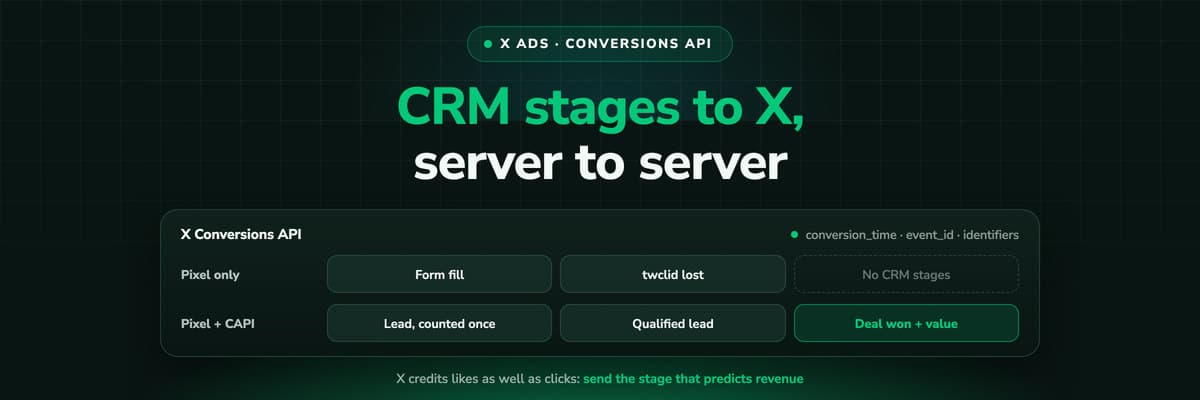 How To Guides
X Conversions API: Setup, Deduplication and CRM Events
The X Pixel reports what a browser lets it see. The Conversions API reports what your server tells it, including stages that happen in the CRM after the form. The endpoint and body, the access token against OAuth, identifiers and hashing, deduplication against the Pixel, the twclid you have to keep yourself, the limits, and what X will credit from a CRM.Read the article16 min read
X journeys
Ready to see what your X clicks turn into?
LeadJourney captures the twclid and UTMs on every X click server-side, keeps them on the LeadJourney Click ID for months and joins them to the lead and the revenue in your CRM. Live in 21 minutes, with a 14-day free trial.


