


















BlogHow To Guides
HubSpot Marketing Hub Attribution: How It Works, Pros and Cons
Nine attribution models, three report types and two subscription tiers. Here is what HubSpot attribution actually credits, what each model does to a real deal, and where its view of the journey begins.

Contents
Summarise this article with AI
Opens the page with a ready prompt in:


Nothing is sent until you pick a service.
HubSpot's attribution reporting is more capable than its reputation among people who have never switched it on. Nine models, from first and last interaction through U shaped, W shaped, full path, time decay and both J shapes. A wide set of interactions that includes ad clicks, page views, forms, CTAs, marketing emails, social clicks, events, calls, meetings and conversations. An ads tool that connects Meta, Google, LinkedIn and TikTok. AI Referrals as a traffic source category of its own.
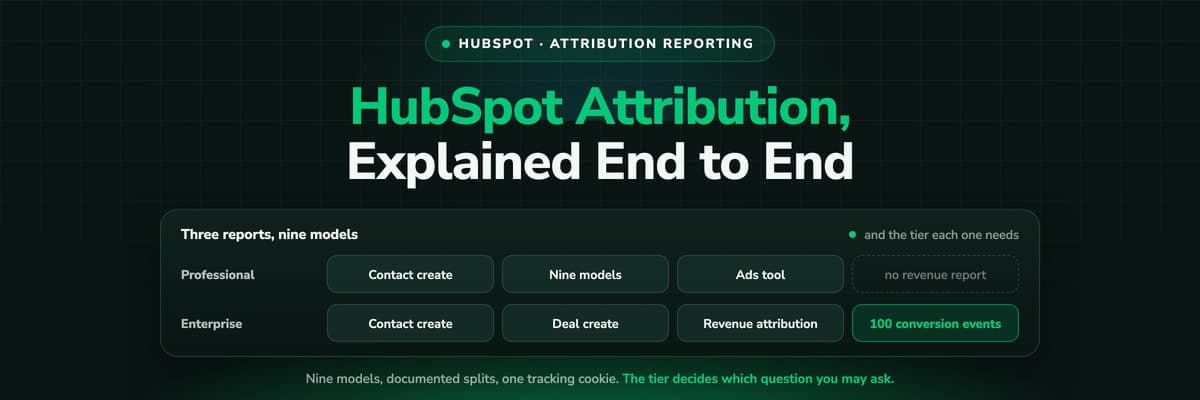
What trips teams up is rarely a missing feature. It is one of three things: which subscription tier a given report needs, what counts as an interaction in the first place, and the difference between contact create attribution and revenue attribution, which are separate reports answering separate questions.
This guide explains how HubSpot attribution works: the three report types, the nine models with the exact credit each one assigns, what HubSpot sees and how, how to read the reports without arguing about them, and the point at which teams add something underneath.
In Short: How HubSpot Attribution Works
In short
HubSpot attribution credits the interactions on a contact's timeline for one of three outcomes: contact creation, deal creation or revenue. Contact create attribution is available on Marketing Hub Professional and Enterprise; deal create and revenue attribution are Marketing Hub Enterprise only. Nine models decide how the credit is split, everything is bucketed by the session HubSpot's tracking code recorded in the browser, and the ads tool brings spend in from Meta, Google, LinkedIn and TikTok.
Three Reports, Three Different Questions
The first thing to get straight is that HubSpot does not have one attribution report. It has three, and they answer questions that a marketing team often treats as interchangeable and should not.
- Contact create attributionWhich interactions produced a new contact. This is a volume question, and it is the report available on Marketing Hub Professional as well as Enterprise.
- Deal create attributionWhich interactions produced a deal. A better proxy for pipeline than contacts, and one of the two reports that needs Marketing Hub Enterprise.
- Revenue attributionWhich interactions produced closed revenue, crediting the deal amount rather than a count. Also Marketing Hub Enterprise only.
Why this matters before anything else
Most searches for a HubSpot attribution tool start here. A team on Professional can attribute contacts but not revenue, and a team on Starter or Sales Hub alone has none of the three. Knowing which report you are actually missing is what turns a vague sense that attribution is broken into a decision with a price on it.
The Nine Models and What Each One Credits
HubSpot's models are unusually specific about their splits, which is helpful: you can predict what a report will say before you run it. These are the splits HubSpot documents.
HubSpot's attribution models and their credit splits
| Model | How the credit is split | Reads best when |
|---|---|---|
| First interaction | 100% to the first interaction | You are judging what creates awareness |
| Last interaction | 100% to the final interaction | You are judging what closes |
| Linear | Equally across every interaction in the path | You want a neutral view with no favourite stage |
| U shaped | 40% first interaction, 40% lead conversion, 20% spread across the rest | Awareness and conversion are the two moments you invest in |
| W shaped | 30% first interaction, 30% contact creation, 30% deal creation, 10% across the rest | You run a defined pipeline with three checkpoints |
| Full path | 22.5% each to first interaction, lead creation, deal creation and last interaction, 10% across the rest | You want the closing stage weighted as heavily as the opening one |
| Time decay | More credit the closer to conversion, on a seven day half-life | Your cycle is short and recency genuinely matters |
| J shaped | 20% first interaction, 60% the conversion, 20% across the rest | The conversion moment is the one you are optimising |
| Inverse J shaped | 60% first interaction, 20% the interaction that led to conversion, 20% across the rest | You are defending investment in top of funnel work |
Nine models is more than most platforms offer, and it is worth resisting the temptation to use all of them. Pick two that disagree in a useful way, usually first interaction and W shaped or full path, and report both. A single model presented as the truth invites an argument that no model can win.
What Counts as an Interaction
HubSpot's interaction set is broad, and this is where the product is genuinely strong. Ad clicks, page views, form submissions, CTA clicks, marketing emails, social post clicks, marketing events, calls, meetings, one to one emails, conversations, imports, blog posts, knowledge articles and external pages can all appear on the path.
Two details decide how much of that you actually get. Interactions are bucketed by the session HubSpot's tracking code recorded in the browser, and HubSpot does not collect data from a visitor who declines the analytics cookie category. So the path is the sequence of sessions the cookie was allowed to see, in the browser it saw them in.
That is also the reason Original Source sometimes disagrees with what a rep heard on a call. Original Source is the first session HubSpot recorded, so a first visit that was blocked, declined or happened on a different device makes the second visit the first touch, and a branded search or a typed URL collects the credit.
Ads, Spend and Click IDs
The ads tool connects Meta, Google, LinkedIn and TikTok, pulls their spend into HubSpot and lets ad interactions appear in the attribution reports. Conversion events can also go back out, over Meta's and LinkedIn's Conversions APIs and Google's Enhanced Conversions for Leads. That is a real closed loop, and it is worth switching on.
Three things are useful to know before you rely on it. Ads ROI in HubSpot is estimated from your average sale price and your contact to customer rate rather than measured from the deals themselves. A conversion event carries a fixed value you set when you create it, the same amount every time, and the number of events is capped by tier: five on Starter, fifty on Professional and a hundred on Enterprise. And of the four click IDs, only gclid arrives on the record by itself, through the automated Google Ads setup, and only when the form sits on the page the ad landed on.
The hidden field problem
fbclid, li_fat_id and msclkid need a hidden field on the form plus a small script that reads the parameter from the URL and writes it in. It works, and it keeps working until somebody builds a new landing page and forgets. If your Meta reporting is reliable for six months and then quietly is not, this is usually why.
What HubSpot Attribution Is Good At
- It is already there. No integration project, no second system of record, and the data is joined to the contacts and deals your team works in every day.
- The model range is genuinely wide, and the splits are documented, so a report can be predicted and explained rather than argued about.
- The interaction set covers sales activity too. Calls, meetings and one to one emails are on the path, which most web analytics tools cannot see at all.
- Ad spend from four networks lands in the same place as the pipeline, so campaign reporting does not need an export.
- AI Referrals is a source category of its own, covering ChatGPT, Claude, Perplexity, Gemini and Copilot, which is ahead of most CRMs.
- Reports are shareable HubSpot objects, so the dashboard a board sees is the same object the marketer edits.
Where HubSpot Attribution Runs Out
These are boundaries rather than faults. Every one of them follows from the fact that HubSpot attributes what its own tracking recorded, inside the tier you bought.
- Tier decides the question you may askContact create attribution is Professional and above. Deal create and revenue attribution are Enterprise only, so a Professional portal can attribute contacts and stops before the money.
- A missed session is not reported as missingInteractions are bucketed by the sessions the tracking code recorded. A visit removed by a blocker, by tracking prevention or by a device switch is silently redistributed among the touches that survived.
- Consent decides what existsNothing is collected from a visitor who declines the analytics cookie category, and a cleared cookie promotes a later visit to first touch.
- One click ID arrives by itselfgclid lands in hs_google_click_id automatically in the right conditions. The Meta, LinkedIn and Microsoft equivalents need a hidden field and a script somebody maintains.
- ROI is estimated, not measuredAds ROI is calculated from your average sale price and your contact to customer rate, so it moves with those averages rather than with the deals that actually closed.
- The value going back out is fixedA conversion event carries the amount you typed when you created it, capped at five, fifty or a hundred events by tier, rather than the real value of the deal that closed.
When HubSpot Attribution Is Enough, and When It Is Not
It is usually enough when
- You are on Marketing Hub Professional or Enterprise and most of your marketing runs inside HubSpot.
- Your traffic is largely organic, email and content, where the tracking code sees most of the journey.
- The decisions you make from it are programme level and quarterly rather than campaign level and weekly.
- Your consent rates are high and your audience is not unusually privacy conscious or technical.
It stops being enough when
- You need revenue attribution but are not on Enterprise, and the upgrade costs more than the answer is worth.
- A large share of spend is on Meta, LinkedIn or Microsoft, whose click IDs do not land on the record by themselves.
- Somebody asks what a closed won deal actually cost, which needs measured spend rather than an estimate from averages.
- You want the ad platforms to bid on real outcomes, which means sending back the deal's own value rather than a fixed number.
How to Read the Reports Without Arguing
- Report two models, not one, and say which is which. First interaction and W shaped disagreeing is information, not a problem.
- Never compare a HubSpot number with an ad platform number as though one is wrong. They count different things in different windows, on purpose.
- Check the share of contacts whose Original Source is Direct or Offline. It is the fastest available measure of how much of your journey is missing.
- Keep campaign naming consistent across HubSpot and the ad accounts, or the joins that do exist will still look broken.
- Decide which report is the one leadership sees, and stop showing the other two in the same meeting.
- Re-check the tier requirements after a HubSpot release. Features move between tiers more often than most teams expect.
What Teams Add Underneath It
Teams that outgrow the native reports rarely leave HubSpot, and they should not: the emails, the workflows and the campaign execution have nowhere better to be. What they add is a layer in front of the portal that records the part HubSpot's cookie cannot.
That is what LeadJourney does. Every visit is recorded server-side, first-party, before HubSpot's tracking code sets its cookie, so the session an ad blocker or Safari removed is still in the journey. All four click IDs are captured at click time wherever the visitor converts. Attribution runs on those events and is written back onto Contacts, Companies and Deals as properties, which is what makes closed won revenue reportable on any tier, Sales Hub alone included. Spend is pulled from Meta, Google, LinkedIn and Microsoft Ads and joined to the deals, so cost per closed won deal is measured rather than estimated, and any lifecycle or deal stage can go back out carrying the deal's own amount and currency.
Both layers earn their place. HubSpot's reports answer which interactions in the portal contributed. A measurement layer answers where the contact came from before the portal knew about them, and what that acquisition cost. For the wider field, we ranked twelve attribution tools for HubSpot, and the HubSpot integration page lists the properties that get written.
Further Reading
FAQ
Frequently Asked Questions
The questions HubSpot users ask about attribution reporting.
Which HubSpot tier do I need for attribution reporting?
Contact create attribution is available on Marketing Hub Professional and Enterprise. Deal create attribution and revenue attribution are Marketing Hub Enterprise only. A portal on Starter, or on Sales Hub without Marketing Hub, has none of the three, which is the single most common reason teams start looking for something else.
How many attribution models does HubSpot have?
Nine: first interaction, last interaction, linear, U shaped, W shaped, full path, time decay, J shaped and inverse J shaped. The splits are documented, for example U shaped gives 40% to the first interaction, 40% to the lead conversion and spreads the remaining 20% across the rest, so a report can be explained rather than argued over.
Why does HubSpot say Direct traffic for contacts that came from ads?
Original Source is the first session HubSpot's tracking code recorded. If that first visit was blocked, declined at the cookie banner or happened on another device, the next visit becomes the first touch, and that is often a branded search or a typed URL. It is a limit of browser based tracking rather than a HubSpot bug.
Does HubSpot capture fbclid and other click IDs?
gclid lands in hs_google_click_id through the automated Google Ads setup, and only when the form sits on the page the ad landed on. fbclid, li_fat_id and msclkid need a hidden field on the form plus a script that reads them from the URL, which somebody has to add to every form and keep working.
Is HubSpot's ads ROI the same as ROAS from my deals?
No. HubSpot estimates ads ROI from your average sale price and your average contact to customer rate. That is useful directionally, and it is not the same as dividing the revenue of the deals a campaign produced by what that campaign cost. If leadership treats the two as identical, the estimate is the number that will be wrong first.
Can I send closed won revenue back to Meta and Google from HubSpot?
You can send conversion events, over Meta's and LinkedIn's Conversions APIs and Google's Enhanced Conversions for Leads, but each event carries a fixed value you set when you create it, and the number of events is capped at five on Starter, fifty on Professional and a hundred on Enterprise. Sending the deal's own amount needs a tool that holds the click ID and the deal value together.
Does HubSpot track AI search traffic like ChatGPT?
Yes. AI Referrals is a traffic source category of its own, covering assistants including ChatGPT, Claude, Perplexity, Gemini and Copilot, and HubSpot also offers a free AEO tool. This is one area where the native reporting is ahead of most CRMs, so it is worth checking before assuming you need something else for it.
Keep reading
More from the blog
 How To Guides
X Ads Conversion Tracking: Pixel, CAPI and CRM Events
X reports what the X Pixel and the Conversions API tell it, credited after any engagement inside windows you set per event. What to count for lead generation and for a store, how the two sources deduplicate on one conversion ID, why X's count and the CRM disagree by design, how to verify it, and which number deserves the budget.Read the article19 min read How To Guides
X Pixel Setup: Base Code, GTM, Shopify and Events
Every way to install the X Pixel, with X's own steps and code: creating it in Events Manager, the base code, event code, Google Tag Manager through the partner integration, Shopify, Ensighten and Tealium. Then the event types and parameters, cookies and consent, and how to check it all with the X Pixel Helper and the event statuses.Read the article18 min read How To Guides
X Conversions API: Setup, Deduplication and CRM Events
The X Pixel reports what a browser lets it see. The Conversions API reports what your server tells it, including stages that happen in the CRM after the form. The endpoint and body, the access token against OAuth, identifiers and hashing, deduplication against the Pixel, the twclid you have to keep yourself, the limits, and what X will credit from a CRM.Read the article16 min read
HubSpot attribution
Attribute closed won revenue on any HubSpot tier
Server-side tracking at 95%+ accuracy, all four click IDs on the record, the journey written back as properties, and the won deal returned to four ad platforms.


