













Heyflow integration
Heyflow tracking that follows every response to the deal it became
Every flow response arrives with its ad click, its answers and its whole journey, and the qualified leads go back to Meta and Google.
30-day money-back guaranteeSetup with a tracking expert
- Live in 21 minutes
- 95%+ accuracy, first-party
- No developer required
Rated by the teams who connected their stack
How the data moves
 HeyflowWhere the lead fills in the flow
- Responses
- Answers
- URL parameters
AI Attribution Engine
LeadJourneyServer-side tracking, six attribution models, every channel in one place- Server-side tracking of every visit
- The whole journey behind each response
- Qualified leads sent back to the ad platforms
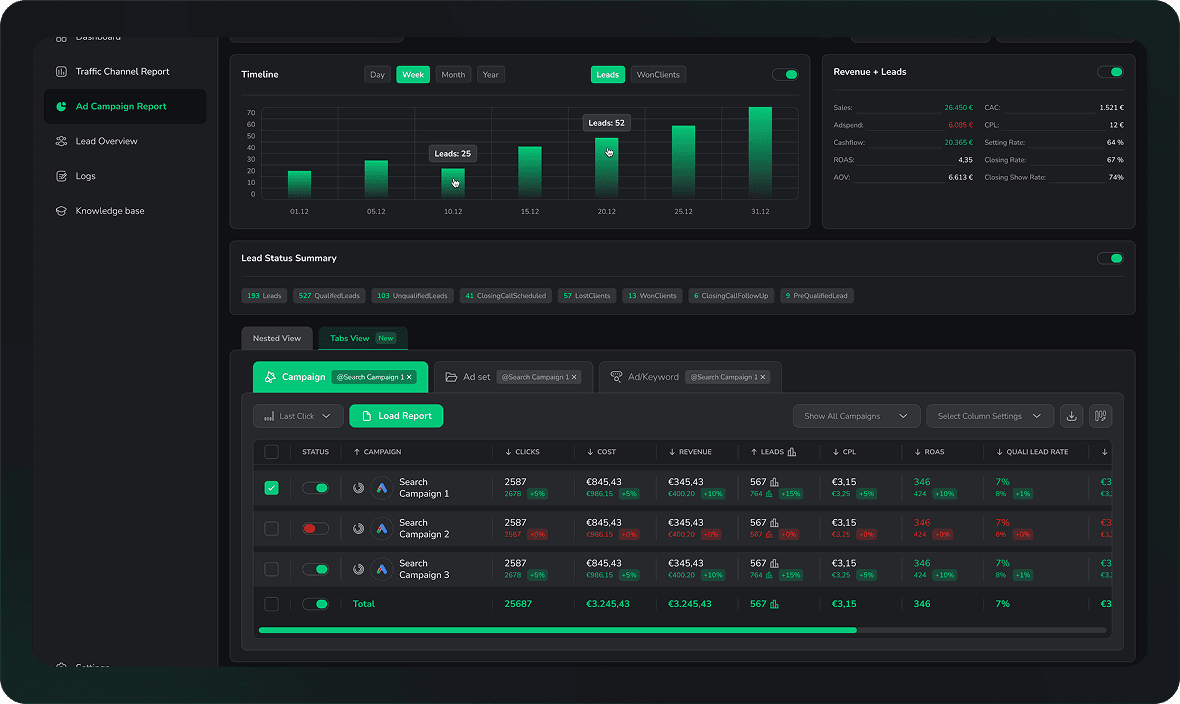
Every response is matched to the click that produced it. It lands as a lead with its answers, campaign and keyword attached, and once that lead qualifies or closes, the result goes back to the ad account.
Trusted by 100+ lead generation businesses, agencies and freelancers
The gap
Heyflow knows the flow was completed. It does not know which responses became customers.
Heyflow's analytics show views, starts, completion rate and where people drop off, screen by screen. What they cannot show is the ad clicked a week before the response, or whether the lead ever signed.
Heyflow tracking on its own
Precise about the flow, blind to the lead's history and outcome
- Heyflow's analytics report views, starts, completion rate and drop-off per screen, so you learn how the flow converts, not what a response was worth.
- The pixel in the flow's tracking settings reports a completed response in the browser, where ad blockers, Safari and declined cookie banners remove a share of them.
- Every response counts the same to Meta and Google, so the algorithm buys more of the cheapest completions, including the renters on a solar quiz and the postcodes you do not serve.
- UTM parameters survive only when they are on the URL the flow was opened from, and only for that one visit.
- An embedded flow sees the visit it was opened on. The ad click and the earlier sessions on your site are not joined to the response.
- Whether the appointment was held, the offer signed or the policy written is decided in your CRM, out of the flow's view.
- No ad spend enters Heyflow, so cost per qualified lead by campaign is a spreadsheet someone rebuilds every month.
Heyflow with LeadJourney
One journey per lead, from the first click to the signed deal
- Every visit to your site and your flows is tracked server-side, with click ID, UTM parameters, referrer and landing page, at 95%+ accuracy.
- Each response lands as a lead with its answers, stitched to the whole journey rather than the last visit.
- Click ID and UTM parameters make the match, and the email address in the response joins it to earlier sessions when they are missing.
- The answers decide quality: a budget band, a postcode or a homeowner question can mark the lead qualified the moment it arrives.
- The lead is followed through your CRM, from appointment set to deal signed, and the revenue lands on the campaign that produced the response.
- Spend is pulled from your ad accounts automatically, so cost per response, per qualified lead and per deal is live by campaign and keyword.
- Qualified leads and won deals go back to Meta and Google server to server, so bidding learns which responses are worth paying for.
How it works
Heyflow responses in, qualified leads and revenue back out
Both chains run on their own once connected: the response becomes a lead with a full journey behind it, and the qualified lead and the revenue go back to the platform that paid for the click.
1 Heyflow tracking from the first click to the response
The journey is recording long before the first screen of the flow.


Every ad click arrives with its click ID and UTM parameters, and organic, referral and AI search visits arrive with their referrer.

On your site, every visit is tracked server-side with its landing page, pages viewed and device, past ad blockers and iOS.
The moment a flow is completed, LeadJourney receives the response with its answers, whether the flow is embedded or runs on its own page.
The response is matched on click ID and UTM parameters, with the email as the fallback, so the lead carries its first click, its last click and every touch between.
2 Qualify on the answers, follow the lead to revenue
So the ad platforms learn which responses were worth paying for.
Rules on the answers mark a lead qualified: the budget band, the postcode, owner or tenant, whatever your flow asks.


The lead is followed through your CRM as it changes stage: appointment set, offer sent, signed, with the value.
Qualified leads and won deals go back to Meta, Google, LinkedIn and Microsoft Ads with their value, so the bidding learns which responses turn into revenue.
The return path
Send Meta the leads you want more of, not every completed flow
A completed flow is the first thing the ad platform hears about. The qualified lead follows the moment its answers or your CRM say so, and the signed deal after that, so campaigns optimise on the responses that become customers.
- MetaConversions API
Response, qualified lead and deal won, with value and currency
- Google AdsOffline conversion import
Conversions matched on gclid, with the deal value for value based bidding
 LinkedIn AdsConversions API
Response and won revenue matched on li_fat_id
 Microsoft AdsOffline conversions
Conversions matched on msclkid, with deal value
You choose what counts as a conversion
Map the response, a qualified lead or the signed deal to a platform event, or all three.
Lead quality becomes the optimisation target
When the platform learns which responses qualify and which never pick up, it buys more of the first kind, so the price per qualified lead falls.
Sent server to server
No pixel to fire, nothing for an ad blocker or a declined cookie banner to remove.
Reporting
The questions Heyflow's analytics cannot answer
Every one of these is a report in LeadJourney rather than an export from a response sheet. Heyflow stays where you build and test flows, and LeadJourney shows where each lead came from and what it was worth.
Which Meta campaign produced the solar quiz responses that became signed contracts last quarter?
What does a response cost us on Meta, Google and TikTok, and what does a qualified lead cost?
Which ad sets fill the flow with answers we cannot serve, a postcode out of area or a budget too small?
Which channel starts our biggest deals, even when a different one opened the flow?
How many leads came from ChatGPT and Perplexity last month, and did any of them sign?
Which flow turns visitors into responses, and which one turns responses into appointments?
LeadJourney and Heyflow's own analytics
Where Heyflow's analytics end and LeadJourney starts
Heyflow's analytics show how each flow converts, from the first screen to the submit, and where people leave. The click before and the deal after are out of view.
| Capability | Heyflow analytics and tracking | With LeadJourney |
|---|---|---|
| Heyflow tracking | Heyflow analytics and trackingThe visit that opened the flow, plus whatever UTM parameters were on that URL and captured into hidden fields. | With LeadJourneyEvery response is matched to the full journey recorded server-side, first click to last, with the email as the fallback when the URL carried nothing. |
| The click before the flow | Heyflow analytics and trackingNot recorded. Analytics start when the flow is viewed. | With LeadJourneyCaptured with its click ID, landing page and referrer, then stitched to the response. |
| Flow performance | Heyflow analytics and trackingViews, starts, completion rate and drop-off per screen, plus A/B tests between variants. This is what Heyflow's analytics are for. | With LeadJourneyLeft to Heyflow. LeadJourney reports on what the responses became. |
| Lead quality | Heyflow analytics and trackingEvery completed flow is one conversion, whatever its answers said. | With LeadJourneyAnswers like budget, postcode or ownership mark a lead qualified, and the CRM stages say whether it signed. |
| Ad spend and cost per lead | Heyflow analytics and trackingNo spend enters Heyflow. Cost per response is calculated somewhere else. | With LeadJourneySpend pulled from Meta, Google, LinkedIn and Microsoft Ads automatically, so cost per response, per qualified lead and per deal are live per campaign. |
| Conversions back to the ad platforms | Heyflow analytics and trackingThe tracking settings report the completed response to Meta and Google. Nothing about the appointment or the signed deal goes back. | With LeadJourneyResponse, qualified lead and won deal sent server to server with value, so the bidding learns which responses pay. |
| Other channels | Heyflow analytics and trackingThe referrer and the URL parameters of the visit that opened the flow, so an AI search visit shows up as whatever it happened to send. | With LeadJourneyOne model across paid, organic, referral and AI search, so every lead is counted once. |
Keep Heyflow. Give every response a history.
Heyflow stays where you design flows, test screens and collect answers. LeadJourney records what happened before the flow and what happened after, and hands the result to the platforms where the budget is spent.
MCP server
Chat with your Heyflow lead data
The same responses, journeys, spend and won revenue are also served over MCP. Ask in Claude or ChatGPT which flow produced the most signed deals last quarter, and the answer comes from your own numbers.
LeadJourney MCP connected, try any tab
Which campaigns produced our closed revenue last month?
Based on your LeadJourney data, 3 campaigns produced 148,200 EUR of closed revenue last month:
- Google Ads, Brand
- 38 leads, 9 closed deals, 61,400 EUR. Shortest path to signature.
- LinkedIn, Retargeting
- 21 leads, 6 closed deals, 48,900 EUR. Seven touchpoints on average.
- Meta, Lookalike DACH
- 54 leads, 5 closed deals, 37,900 EUR. Cheapest qualified lead.
Want this as a weekly summary in Slack?
Ask anything about your lead journeys
Where did our three biggest deals this quarter come from?
Your 3 largest deals this quarter all started somewhere the last click never showed you:
- 42,000 EUR
- First touch LinkedIn Ads, closed 63 days later after a webinar signup.
- 28,500 EUR
- First touch Google organic, paid click on day 11, demo on day 19.
- 21,800 EUR
- First touch a Meta video view, form filled from email six weeks on.
Want the full touchpoint list for any of them?
Ask anything about your closed deals
Which landing pages turn LinkedIn traffic into qualified leads?
3 pages take your LinkedIn traffic, and the qualified rate between them runs from 4% to 18%:
- /demo/attribution
- 18% qualified from 214 visits. Highest intent page on the site.
- /guide/server-side
- 9% qualified from 612 visits. Most journeys stall after the download.
- /pricing
- 4% qualified from 488 visits. Second most traffic, lowest intent.
Want the same breakdown for Google Ads traffic?
Ask anything about your landing pages
What did each channel cost per qualified lead last week?
3 channels spent budget last week. Cost per qualified lead ran from 41 EUR to 187 EUR:
- LinkedIn Ads
- 41 EUR per qualified lead. 2,300 EUR spent, 56 qualified.
- Google Ads
- 88 EUR per qualified lead. 4,400 EUR spent, 50 qualified.
- Meta Ads
- 187 EUR per qualified lead. 3,740 EUR spent, 20 qualified.
Want an alert the moment a channel passes 120 EUR?
Ask anything about your cost per lead
What do the journeys that close have in common?
3 signals show up in most of your closed deals and in almost none of the lost ones:
- Pricing page, 2+ visits
- In 71% of closed deals. In 12% of the ones that never closed.
- Demo within 14 days
- In 64% of closed deals. Median 9 days from the first click.
- Second contact
- In 58% of closed deals. A colleague of the lead arrives on site.
Want these three scored onto every lead in your CRM?
Ask anything about your lead journeys
Setup
Connected to Heyflow in about 21 minutes
No developer, no Zapier chain and no data warehouse.
- 1About 5 minutes
Add a single line of code
Paste the LeadJourney script into your site or your GTM container. It starts recording visits, click IDs and UTM parameters immediately, on every page your flows live on.
- 2About 10 minutes
Connect Heyflow and your CRM
Add the LeadJourney webhook URL to the flows in scope in Heyflow's integrations, then connect the CRM where the leads end up. From then on every response arrives as a lead with its journey attached.
- 3Same day
Map answers and stages to conversions
Choose which answers make a lead qualified and which CRM stages count as a deal. Each one then goes back to the ad platform that produced the click, with the value attached.
Original reviews
What our customers wrote, word for word
4.9 out of 5 across 11 public reviews. Quoted as they were left, shortened only by dropping whole sentences.
- 5 out of 5 starsGoogle
“Before LeadJourney, we had no reliable tracking concept for our five-figure ad spend. We were manually building spreadsheet and CRM reports, inaccurate and time-consuming. Within two days, everything was set up. For the first time, I know exactly what I pay per lead and which campaigns actually bring in the best-qualified prospects.”
 Florian BuckCEO, Klickkraft GmbH
“With LeadJourney we are able to track all our leads and connect them with sales and attribution data to make better decisions. In the first month of using it we scaled from 0 to 100k revenue from paid ads only.”
 GetreachBacklinks Marketplace (SaaS)
- 5 out of 5 starsG2
“LeadJourney finally fixed my Marketing Analytics. It goes way beyond basic Ad Tracking Software. The Customer Journey Report saves hours of digging, and capturing everything from Offline Conversions to AI Search Tracking makes it the Best B2B Attribution Platform available.”
Sascha LenzMarketing Manager
- 5 out of 5 starsTrustpilot
“Connected LeadJourney for 2 clients, setup took literally 20 minutes each. The data became more accurate, the reports actually make sense. Now clients look at the dashboard and the 'why don't the numbers match?' questions are gone.”
 Alexander SamarPerformance Marketing Agency
- 5 out of 5 starsGoogle
“With LeadJourney, we have finally found a tool that provides us with the data we need to scale our performance marketing campaigns. The most important KPI is no longer lead price but cost per qualified lead.”
 Steffen SiesingCEO, Bilanzmanufaktur GmbH
- 5 out of 5 starsG2
“The ability to track both online and offline conversions in one unified dashboard has given us insights we never had before. Our ROI has improved dramatically since we started integrating LeadJourney with our CRM. We're finally able to see the full customer journey, and it's been a game changer for our strategy.”
 Andre WitzelFounder, Trading.de
- 5 out of 5 starsTrustpilot
“The ability to seamlessly integrate data from multiple channels and see real-time insights has significantly improved our campaign results. We now focus on metrics that truly matter, like ROI and qualified leads.”
 Nikita YatsunCEO, RLV Media GmbH
Read the reviews where they were left
FAQ
What Heyflow users ask before connecting
If yours is not here, our team answers in the chat within a few minutes.
How is Heyflow tracking with LeadJourney different from Heyflow's own analytics?
Heyflow's analytics describe the flow: views, starts, completion rate and the screen where people leave. LeadJourney describes the lead: the ad clicked a week earlier, the organic visit in between, the answers given, and whether the lead later qualified and signed. The two answer different questions, and most teams keep both.
I already have the Meta pixel in Heyflow. Why add the Conversions API?
The pixel reports a completed response from the visitor's browser, so ad blockers, Safari and declined cookie banners remove a share of them, and every response it reports counts the same. LeadJourney sends server to server through Meta's Conversions API, and it can send the event you actually want more of: the qualified lead or the signed deal, with its value.
Does Heyflow conversion API tracking replace the pixel in my flow?
It does not have to. Many teams keep the pixel on the completed response and let LeadJourney send the qualified lead and the deal as separate events, so Meta can be told to optimise on those. If you send the same event from both, give them a shared event ID so Meta counts it once; our team sets that up with you.
Does it work with embedded flows and with standalone Heyflow pages?
Both. An embedded flow is matched to the visits on your site the server already recorded, which is the cleanest case. A standalone flow page you link from an ad keeps its click ID and UTM parameters as URL parameters, and the email address in the response joins it to earlier sessions when it has to.
Which Heyflow responses does LeadJourney capture?
Completed responses from the flows you connect, with the answers you map. Each one lands as a lead with its full journey attached, and once the lead is in your CRM the stage changes are read from there, so the same record grows from response to appointment to signed deal.
Can the answers in my flow decide which leads count as qualified?
Yes. A rule on an answer, a budget band, a postcode in your service area or an owner rather than a tenant, marks the lead qualified as it arrives, and that can go back to Meta and Google as its own conversion before the CRM has said anything.
Can I see cost per lead for each flow?
Yes. Spend is pulled from your ad accounts and joined to the responses, so cost per response and per qualified lead are live per campaign, channel and keyword, and you can break them down by flow. Once the CRM is connected, cost per signed deal sits next to them.
Do I need a developer?
No. The script is one line in your site or your GTM container, connecting Heyflow is a webhook URL pasted into the flow's integrations, and mapping answers and stages to events is a settings screen. Most accounts are live in about 21 minutes, and our team will do the setup with you on a call if you prefer.
Is it GDPR compliant?
Yes. Data is processed and stored in the EU, we sign a data processing agreement, and tracking runs first-party and server-side so consent decisions are respected rather than worked around. You choose which answers are sent to LeadJourney, so anything you do not map stays in Heyflow.
What does it cost?
The Heyflow integration is part of the platform rather than a paid add on. Plans are priced by ad spend instead of seats, so your whole team and your agency can share one workspace, and every plan comes with onboarding by a tracking expert and a 30-day money-back guarantee.
More integrations
More form integrations
Connected the same way, attributed in the same dashboard. The rest of your stack reports right next to this one.


95%+ accuracy, from ad click to Heyflow response
See which campaigns produce signed deals, not just completed flows, with LeadJourney
Connect Heyflow, your ad accounts and your CRM, and watch every response line up against the click that produced it and the deal it became.
30-day money-back guaranteeSetup with a tracking expert