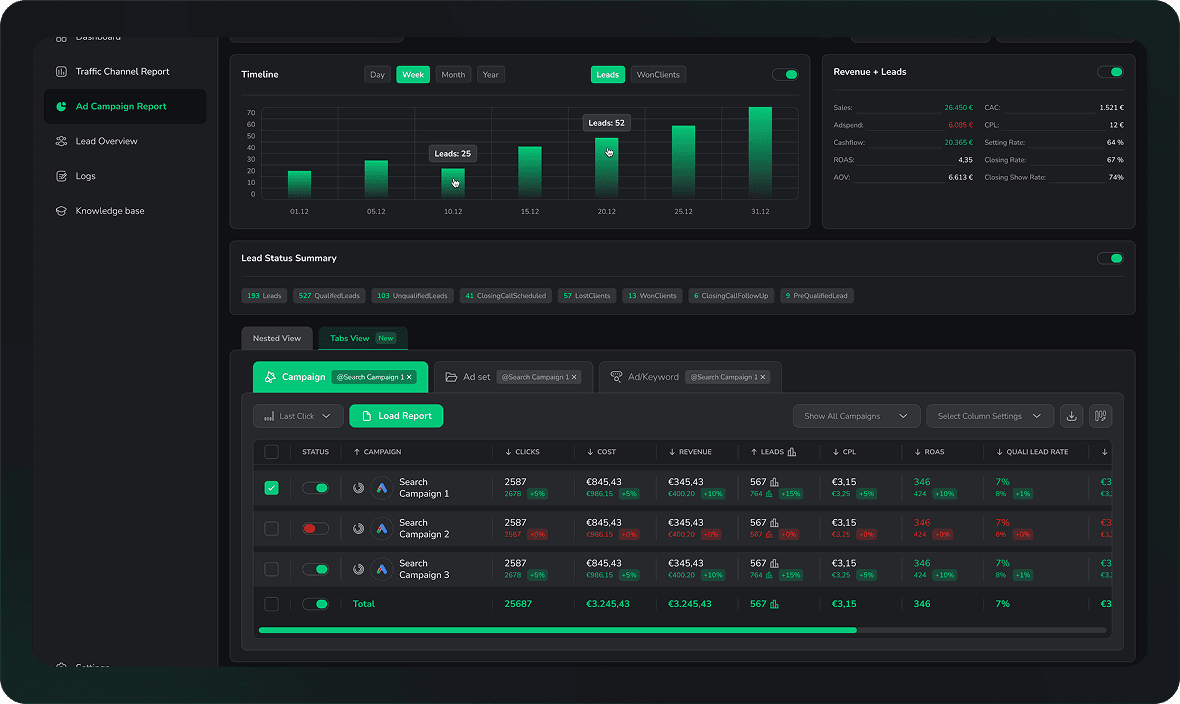













Snowflake integration
Snowflake marketing attribution data, written into an account you own
Every click, conversion and lead LeadJourney records lands in your own Snowflake database, already joined to the campaign that produced it and the revenue it earned. Power BI, Tableau, Sigma and your dbt models read it from there.
30-day money-back guaranteeSetup with a tracking expert
- Live in 21 minutes
- 95%+ accuracy, first-party
- No pipeline to maintain
Rated by the teams who connected their stack
How the data moves
- Organic search
- Organic social
- AI search
AI Attribution Engine
LeadJourneyServer-side tracking, every channel in one journey- Server-side tracking of every visit
- Every touchpoint credited per lead
- The finished rows written to your schema
SnowflakeYour account, your database- Clicks
- Conversions
- Leads
The export is the same data the reports run on, not a second version of it. What lands in your Snowflake tables is what the dashboard shows and what the ad platforms are sent, so a number nobody can reproduce in SQL is not a thing that can happen.
Trusted by 100+ lead generation businesses, agencies and freelancers
The gap
Snowflake has the spend and the deals. What it never had is the click between them.
An ELT tool will load every ad platform, your CRM and the analytics export into Snowflake. None of them delivers the one join the whole project exists for: which click produced which deal.
Marketing data in Snowflake, loaded by hand
Every source in one account, and still no answer
- Each ad platform reports its own conversions on its own schema, so the same lead is counted by two platforms and the totals never agree.
- The click side usually comes from a browser analytics export: ITP, ad blockers and declined banners take their share before the row exists.
- The CRM sync has the deal, its stage and its value, and no field on it says which campaign started the journey.
- Joining the two is identity resolution: a dbt model somebody writes, tests against edge cases and then owns forever.
- Attribution models are more models. Changing the definition means a full refresh and explaining why last month's number moved.
- A platform changes an API and the sync breaks, usually on a Monday, usually noticed in a dashboard.
- Nothing leaves the warehouse. Sending the closed deal back to Meta or Google is a reverse ETL tool and another pipeline.
The tables LeadJourney fills
Rows that are already joined, appended as they happen
- Every visit is captured server-side and first-party on your own domain, at 95%+ accuracy, before any consent tool or ad blocker gets a vote.
- Clicks, conversions and leads arrive as three tables that are already joined per lead, so the first useful query is a SELECT rather than a model.
- The conversion the lead reached and the deal value sit on its row, because LeadJourney read the stage from HubSpot, Salesforce, Pipedrive or a webhook before the row was written.
- Spend is pulled from every connected ad account, so cost per qualified lead and ROAS are figures rather than a quarterly spreadsheet.
- Last Click, First Click, Linear, Time Decay, U-Shaped and Progressive are switchable in the product, without a full refresh or a rewritten model.
- There is no sync to own. The export is a connection, so an API change at Meta is our problem and not your Monday.
- The same rows go back to Meta, Google, LinkedIn and Microsoft Ads as conversions, which is the thing a warehouse cannot do at all.
How it works
From the ad click to your own SELECT statement
One direction, running on its own once connected. What arrives is the finished dataset, so the work your team would have spent on the join goes into the questions instead.
1 Snowflake marketing attribution: recorded, attributed, then written to your schema
Everything that reaches the reports reaches the export.


Ad clicks, spend, sessions and click IDs are tracked server-side across paid, organic and AI search.
The CRM stage and the deal value join the journey, and the revenue is attributed with the model you chose.
Clicks, conversions and leads are appended to tables in the database and schema you created, within minutes of the event.
Your account, your warehouse, your roles. LeadJourney writes rows and reads nothing back.
2 Every tool that reads Snowflake now reads your attribution data
No connector from us, because the tables are the connector.
The tables sit in your account next to whatever else your team already loads into it.



Power BI, Tableau, Sigma, Hex and Looker Studio read Snowflake with their own connectors, so they point at these tables like any other.
The board leadership already opens keeps its layout and starts running on attributed revenue.
Your dbt models, cohorts and forecasts join marketing to everything else in the warehouse.
The return path
The rows do not only land in Snowflake. They go back to the ad account.
A warehouse reads. It has no way to tell Meta that the lead it delivered in March closed in June, and that is the half of the loop that makes the next campaign cheaper.
- MetaConversions API
Qualified leads, booked meetings and won deals, with the deal value
- Google AdsOffline conversion import
Deals matched on gclid, with the revenue for value based bidding
- LinkedIn AdsConversions API
Stage changes and won deals matched on li_fat_id
 Microsoft AdsOffline conversions
Deals matched on msclkid, with the amount
One record, two destinations
The row your analyst queries and the conversion Meta receives come from the same record, so the ad account and the warehouse cannot drift apart.
You choose what counts
Map any CRM stage to any platform event. Qualified lead, meeting booked, deal won, or all three, each with its own value.
Sent server to server
No pixel to fire, nothing for an ad blocker or a declined cookie banner to remove on the way out.
Reporting
The models your team stops writing
Every one of these is a built-in report, answered before the export is switched on. The tables are there for the questions after these, the ones only your business has.
Which campaign produced the revenue the CRM closed last quarter, not the conversions the platform claimed?
What does a qualified lead cost per channel, once the spend and the conversion are on the same row?
Which landing pages start the journeys that end in a won deal, rather than the ones with the best form rate?
How much pipeline came from ChatGPT, Perplexity and Gemini, as sources of their own?
How does the same month look on First Click and on Last Click, without a full refresh?
Which channels bring the customers that stay, once you join them to the product and billing data already in Snowflake?
LeadJourney and a warehouse you fill yourself
Where a loaded Snowflake account ends and LeadJourney starts
Snowflake will store anything and query it fast. What it cannot do is decide which click produced which deal, because nothing that loads into it knows.
| Capability | Snowflake, loaded by your team | With LeadJourney |
|---|---|---|
| Snowflake marketing attribution | Snowflake, loaded by your teamA dbt project your team writes: stitch sessions to leads, leads to deals, then divide credit. Possible, and it is a project with an owner. | With LeadJourneyArrives already joined. Clicks, conversions and leads land as three related tables, one journey per lead. |
| Where the click data comes from | Snowflake, loaded by your teamUsually a browser analytics export, so ITP, ad blockers and declined banners take a share before the row exists. | With LeadJourneyServer-side and first-party on your own domain, at 95%+ accuracy, with the click IDs stored at the moment of the click. |
| CRM revenue on the row | Snowflake, loaded by your teamA separate CRM sync, on its own schema, with no field naming the campaign that started the journey. | With LeadJourneyRead from HubSpot, Salesforce, Pipedrive, Close, Attio or a webhook, and on the row as the conversion the lead reached and the revenue on it. |
| Ad spend | Snowflake, loaded by your teamOne connector per platform, each with its own currency, timezone and definition of a day. | With LeadJourneyPulled from every connected ad account automatically, so cost per qualified lead and ROAS are never more than two hours behind. |
| Attribution models | Snowflake, loaded by your teamA model per definition. Changing it means a full refresh and explaining the new number. | With LeadJourneyLast Click, First Click, Linear, Time Decay, U-Shaped and Progressive, switchable in the product without re-processing anything. |
| Organic, direct, referral and AI search | Snowflake, loaded by your teamAs good as the analytics export you loaded, which usually files AI assistants under referral or direct. | With LeadJourneyFirst class channels next to paid, with ChatGPT, Perplexity, Claude and Gemini as distinct sources. |
| Who maintains the pipeline | Snowflake, loaded by your teamYour team. A platform changes an API, a sync fails, and somebody rebuilds the model behind it. | With LeadJourneyNobody on your side. The export is a connection, not a job you own. |
| Conversions back to the ad platforms | Snowflake, loaded by your teamOut of scope. A warehouse reads; sending the closed deal back is a reverse ETL tool and another pipeline. | With LeadJourneyEvery stage change and won deal goes back to Meta, Google, LinkedIn and Microsoft Ads from the same rows. |
| The people without SQL | Snowflake, loaded by your teamWait for an analyst, or for the dashboard somebody has to build and keep. | With LeadJourneyReports, dashboards and Atlas answer in plain language from the same data, so the warehouse is for the hard questions. |
Keep Snowflake. Fill it with rows worth querying.
Snowflake stays where your team joins marketing to everything else the business knows. LeadJourney supplies the one dataset the connectors cannot: the click, the lead and the closed deal, already on the same row, and it hands that same record back to the ad platforms on the way past.
MCP server
Not every question deserves a query
The same journeys, spend and attributed revenue are served over MCP as well. Ask in Claude, ChatGPT or Cursor, and the answer comes from your own numbers without anyone opening a worksheet.
LeadJourney MCP connected, try any tab
Which campaigns produced our closed revenue last month?
Based on your LeadJourney data, 3 campaigns produced 148,200 EUR of closed revenue last month:
- Google Ads, Brand
- 38 leads, 9 closed deals, 61,400 EUR. Shortest path to signature.
- LinkedIn, Retargeting
- 21 leads, 6 closed deals, 48,900 EUR. Seven touchpoints on average.
- Meta, Lookalike DACH
- 54 leads, 5 closed deals, 37,900 EUR. Cheapest qualified lead.
Want this as a weekly summary in Slack?
Ask anything about your lead journeys
Where did our three biggest deals this quarter come from?
Your 3 largest deals this quarter all started somewhere the last click never showed you:
- 42,000 EUR
- First touch LinkedIn Ads, closed 63 days later after a webinar signup.
- 28,500 EUR
- First touch Google organic, paid click on day 11, demo on day 19.
- 21,800 EUR
- First touch a Meta video view, form filled from email six weeks on.
Want the full touchpoint list for any of them?
Ask anything about your closed deals
Which landing pages turn LinkedIn traffic into qualified leads?
3 pages take your LinkedIn traffic, and the qualified rate between them runs from 4% to 18%:
- /demo/attribution
- 18% qualified from 214 visits. Highest intent page on the site.
- /guide/server-side
- 9% qualified from 612 visits. Most journeys stall after the download.
- /pricing
- 4% qualified from 488 visits. Second most traffic, lowest intent.
Want the same breakdown for Google Ads traffic?
Ask anything about your landing pages
What did each channel cost per qualified lead last week?
3 channels spent budget last week. Cost per qualified lead ran from 41 EUR to 187 EUR:
- LinkedIn Ads
- 41 EUR per qualified lead. 2,300 EUR spent, 56 qualified.
- Google Ads
- 88 EUR per qualified lead. 4,400 EUR spent, 50 qualified.
- Meta Ads
- 187 EUR per qualified lead. 3,740 EUR spent, 20 qualified.
Want an alert the moment a channel passes 120 EUR?
Ask anything about your cost per lead
What do the journeys that close have in common?
3 signals show up in most of your closed deals and in almost none of the lost ones:
- Pricing page, 2+ visits
- In 71% of closed deals. In 12% of the ones that never closed.
- Demo within 14 days
- In 64% of closed deals. Median 9 days from the first click.
- Second contact
- In 58% of closed deals. A colleague of the lead arrives on site.
Want these three scored onto every lead in your CRM?
Ask anything about your lead journeys
Setup
From nothing to rows in your Snowflake tables, in one sitting
No pipeline to build, no ELT licence and nobody's Monday spent on a broken sync.
- 1About 21 minutes
Add a single line of code
Paste the LeadJourney script into your site or your GTM container, and connect the ad accounts you buy on and the CRM your deals live in. This is the part that produces the data worth exporting.
- 2About 10 minutes
Paste your account identifier and a key in the Apps tab
Create a database, a schema and a warehouse for the export, and a role and service user for LeadJourney with usage on all three and the right to create tables in that one schema. Paste the account identifier, the user and its private key into the Snowflake app, and the connection is checked before anything is stored, so a missing grant fails there and then.
- 3Same day
Add a destination and map your columns
One destination per event: New Click, New Conversion Event or New Lead. Name the table or take the default, choose whether it appends a row per event or keeps one row per lead, and point each LeadJourney field at a column. We create the tables and add columns as your mapping grows.
Original reviews
What our customers wrote, word for word
4.9 out of 5 across 11 public reviews. Quoted as they were left, shortened only by dropping whole sentences.
- 5 out of 5 starsGoogle
“Before LeadJourney, we had no reliable tracking concept for our five-figure ad spend. We were manually building spreadsheet and CRM reports, inaccurate and time-consuming. Within two days, everything was set up. For the first time, I know exactly what I pay per lead and which campaigns actually bring in the best-qualified prospects.”
 Florian BuckCEO, Klickkraft GmbH
“With LeadJourney we are able to track all our leads and connect them with sales and attribution data to make better decisions. In the first month of using it we scaled from 0 to 100k revenue from paid ads only.”
 GetreachBacklinks Marketplace (SaaS)
- 5 out of 5 starsG2
“LeadJourney finally fixed my Marketing Analytics. It goes way beyond basic Ad Tracking Software. The Customer Journey Report saves hours of digging, and capturing everything from Offline Conversions to AI Search Tracking makes it the Best B2B Attribution Platform available.”
Sascha LenzMarketing Manager
- 5 out of 5 starsTrustpilot
“Connected LeadJourney for 2 clients, setup took literally 20 minutes each. The data became more accurate, the reports actually make sense. Now clients look at the dashboard and the 'why don't the numbers match?' questions are gone.”
 Alexander SamarPerformance Marketing Agency
- 5 out of 5 starsGoogle
“With LeadJourney, we have finally found a tool that provides us with the data we need to scale our performance marketing campaigns. The most important KPI is no longer lead price but cost per qualified lead.”
 Steffen SiesingCEO, Bilanzmanufaktur GmbH
- 5 out of 5 starsG2
“The ability to track both online and offline conversions in one unified dashboard has given us insights we never had before. Our ROI has improved dramatically since we started integrating LeadJourney with our CRM. We're finally able to see the full customer journey, and it's been a game changer for our strategy.”
 Andre WitzelFounder, Trading.de
- 5 out of 5 starsTrustpilot
“The ability to seamlessly integrate data from multiple channels and see real-time insights has significantly improved our campaign results. We now focus on metrics that truly matter, like ROI and qualified leads.”
 Nikita YatsunCEO, RLV Media GmbH
Read the reviews where they were left
FAQ
What data teams ask before switching the export on
If yours is not here, our team answers in the chat within a few minutes.
How does Snowflake marketing attribution work with LeadJourney?
LeadJourney does the attribution and Snowflake stores the result. The script records every visit server-side, the CRM supplies the deal, the revenue is credited with the model you chose, and the finished clicks, conversions and leads are written into tables in your own database and schema. Your team queries attributed rows instead of building the join in dbt first.
What exactly lands in the tables?
Clicks, conversions and leads: the same records the reports run on, already joined per lead. You choose the columns on the mapping screen, and what is worth mapping first is the attribution (traffic channel, plus first and last touch campaign, ad set, ad, asset and keyword, each as an ID and a readable name), the platform click ID that came in on the click, the revenue and cash collected, and the person. It is the attributed dataset rather than a raw event dump, which is the point: the join is the part a warehouse cannot make on its own.
How often does the export run?
Rows are appended within minutes of the event, not in a nightly batch. A short hold before each write is deliberate: a lead that gets an email address attached thirty seconds after the click should be written once, complete, because an appended row is history and stays exactly as thin as it was written.
Whose Snowflake account is the data in?
Yours. You create the database, the schema and the warehouse in your own account, on whichever cloud and region it runs in, you set the roles, and you pay Snowflake for the storage and the compute the way you already do. LeadJourney writes rows with a service user you create and can disable at any time.
Do you have a Power BI, Tableau or Sigma connector?
No, and none is needed. Power BI, Tableau, Sigma, Hex and Looker Studio read Snowflake with their own connectors, and dbt runs inside it, so once the export is running they point at these tables the way they point at any other. That is why the export lands in Snowflake: one destination, and the tools your team already uses follow.
What does the LeadJourney role need?
Usage on the database, the schema and the warehouse you created for the export, and the right to create tables in that one schema. That is the whole blast radius. The export is one-way: nothing is read back out, LeadJourney cannot see another schema, and it cannot create databases, which is why you make them yourself. Disabling the user stops the export and changes nothing else.
When does the first row arrive, and what about my history?
The first row lands minutes after the next click, conversion or lead, so on a live site that is shortly after you save the connection. The history already in your workspace is not loaded: a table fills from the moment you switch the destination on. If you need the back catalogue in there, ask us about a one-off load.
What will the export cost us in Snowflake?
Conversions and leads are low volume and cheap. Clicks are not: one row per click can be tens of thousands a day, and every load runs on the warehouse you assigned, so give the export an extra small warehouse that suspends itself, and on the clicks table map only the columns you will actually query. Storage and compute are billed to your own account.
Can I export to BigQuery instead, or both?
Yes. The BigQuery export is the same feature with a Google Cloud dataset as the destination, set up the same way from the Apps tab. A workspace can feed one or both, so a group running Snowflake centrally and BigQuery for one team does not have to choose.
Do I need a warehouse to use LeadJourney?
No, and most customers do not have one. The reports, the dashboards, the scheduled emails and Atlas answer the same questions without SQL. The export is for the teams that already run a warehouse and would rather join marketing to the rest of the business themselves.
Can I export several workspaces?
Yes. Each workspace connects its own schema, which is how an agency keeps client data apart and how a group keeps each entity's data in its own database. Ask us about the shape you need before the rollout.
Which plans include the Snowflake export?
The Scale and Enterprise plans, alongside API access and the BigQuery export. Plans are priced by ad spend rather than seats, every plan starts with onboarding by a tracking expert, and the first payment is covered by a 30-day money-back guarantee. On every plan the same data is reachable through the Zapier app, webhooks and the MCP connection.
Is exporting to our own Snowflake account GDPR compliant?
It is the arrangement most data protection officers prefer, because the data lands in infrastructure you control under your own agreement with Snowflake. On our side, LeadJourney processes and stores data in the EU, signs an Art. 28 data processing agreement, and tracks first-party and server-side so consent decisions are respected rather than worked around.
More integrations
More data and BI integrations
The export lands in BigQuery, and these read BigQuery natively. No connector to install and none written by us.
Your data, in your stack
Put the attributed dataset in your own Snowflake
Connect your ad accounts and your CRM, switch the export on, and the rows that explain your revenue land next to everything else your team already queries.
30-day money-back guaranteeSetup with a tracking expert