











Tax and accounting
54% better lead quality after using LeadJourney for marketing
Karsten Guhr
Managing Director
Read the story
Looker Studio alternative
A dashboard cannot fix the data underneath it. LeadJourney collects the data on your domain and joins it to spend and CRM revenue.
Rated by the teams who switched
Trusted by 100+ lead generation businesses, agencies and affiliates








LeadJourney vs Looker Studio
Looker Studio is the last step of a stack; LeadJourney is the stack. The rows are the features our pricing page lists, with what Looker Studio does for each one next to them, so the table shows what the dashboard tool leaves to you.
| Capability | Looker Studio | LeadJourney |
|---|---|---|
| Built for | Looker StudioAnyone who needs a report from data that already exists somewhere: GA4, Ads, Sheets, BigQuery. | LeadJourneyLead generation first, B2B and B2C: forms, calls, CRM stages and closed deals are the conversion model, plus e-commerce through the Shopify integration or a manually connected shop, for advertisers, agencies and affiliates. |
| Collects data | Looker StudioNo. It visualises what a connector delivers. | LeadJourneyYes. First-party tracking on your own domain, server-side, 95%+ of conversions captured, plus static and dynamic call tracking numbers as an add-on. |
| Joins the sources | Looker StudioBlends across connectors, with row limits and the join keys built by you. | LeadJourneyMeta, Google, LinkedIn and Microsoft Ads, organic sources, the CRM and custom channels joined per lead, with nothing to configure. |
| Attribution models | Looker StudioWhatever model the source reports; GA4's and Google Ads' numbers rarely agree. | LeadJourneyEvery rule-based model on every plan, switchable without re-tracking; custom models on Enterprise. |
| CRM and pipeline | Looker StudioA CRM connector shows CRM data; joining it to the click is your data model. | LeadJourneyHubSpot, Salesforce, Pipedrive, Close, Attio, GoHighLevel, ActiveCampaign and Odoo natively, any CRM by webhook, with stages, deal values and CRM enrichment. |
| Revenue back to the ad platforms | Looker StudioNot part of the product; a dashboard reads, it does not send. | LeadJourneyConversions API sync to Meta, Google, LinkedIn and Microsoft on every plan; stage changes and closed deals arrive as offline conversions. |
| Organic and AI search sources | Looker StudioOnly as well as the source classifies them; GA4 files AI engines under referral or direct. | LeadJourneyGoogle, Bing, YouTube, LinkedIn and the AI engines (ChatGPT, Gemini, Claude, Copilot, Perplexity, Grok and DeepSeek) as distinct sources, out of the box. |
| Lead-level view | Looker StudioAggregates; a lead-level journey needs a warehouse and a model behind the dashboard. | LeadJourneyThe full journey of every named lead, from the first click to the closed deal, with the CRM stage on it. |
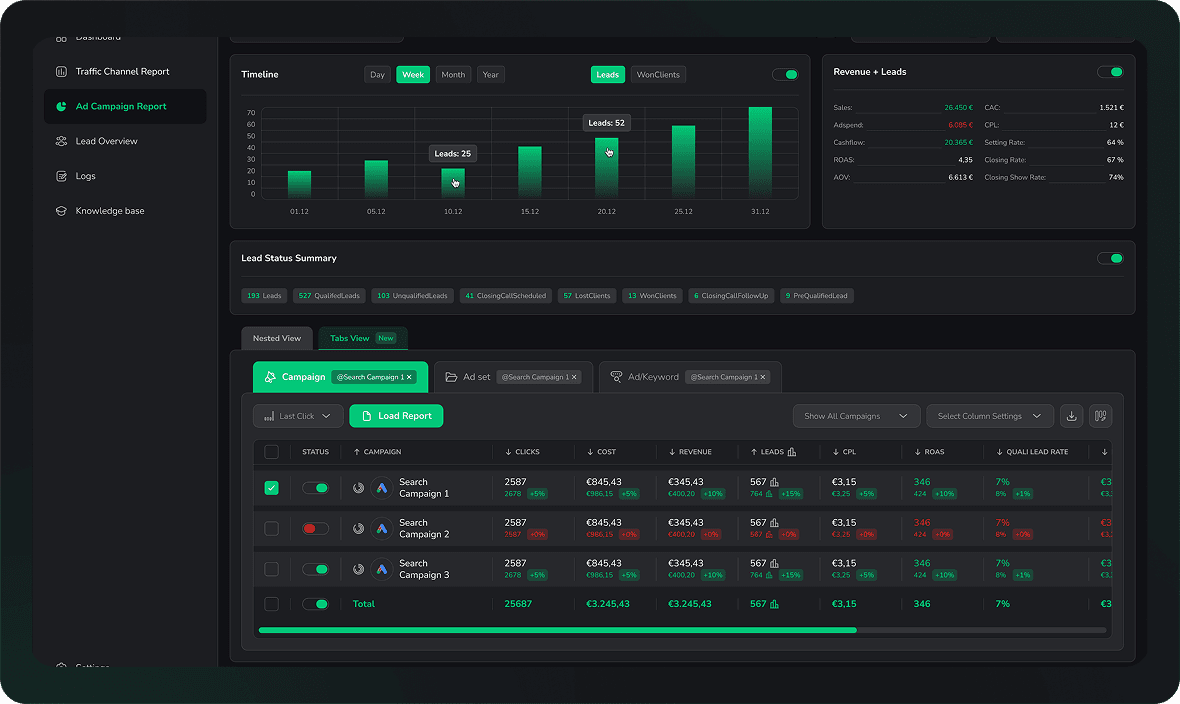
| Reports | Looker StudioAnything you can build, and you build all of it, then maintain it when a connector changes. | LeadJourneyChannel, campaign, landing page and conversion path reports built in, a custom report builder and saved dashboards. |
| AI analyst | Looker StudioGemini summaries and questions on the data in the report. | LeadJourneyAtlas answers questions in plain language; Atlas agents watch the data and send scheduled reports to email, Slack or WhatsApp. |
| Scheduled reports | Looker StudioScheduled email delivery of a report, Pro for team workspaces. | LeadJourneyScheduled email reports on every plan from Starter, per client for agencies. |
| MCP, API and export | Looker StudioNone of its own; the sources have theirs. | LeadJourneyMCP connection for Claude, ChatGPT and Cursor, API and Zapier app, either of which can feed a Looker Studio board through a Sheet; the data warehouse export streams the raw data into BigQuery, which Looker Studio reads natively. |
| Data hosting and compliance | Looker StudioGoogle infrastructure; the data lives in the sources it reads. | LeadJourneyFrankfurt, Germany. First-party tracking on your domain, Art. 28 GDPR DPA on request, two-factor authentication. |
| Setup | Looker StudioHours to days per dashboard, plus the connectors, plus the maintenance. | LeadJourneySelf-serve, live in 21 minutes with the reports filled; onboarding call with a tracking expert from Starter. |
| Pricing | Looker StudioFree; Looker Studio Pro per user; partner connectors often paid per source. | LeadJourneyPublic tiers by marketing spend: from €129 a month, monthly or yearly, after a 14-day free trial. |
Looker Studio is free, it draws a good chart, and for a report on data that is already clean it is the right tool. Some customers keep a board for the executive team, fed through the API. The table is about the work a dashboard does not do: collecting the clicks, joining them to spend and CRM revenue, and attributing them.
Why teams switch
Three arguments come up in almost every evaluation. Each one is a set of concrete capabilities, not a slogan.
Conversions are recorded on your own domain and sent server to server, so ad blockers, iOS and declined consent lose far less of them. 95%+ of conversions captured.
Real conversions and revenue go back to Meta, Google, LinkedIn and Microsoft server-side, so their algorithms optimise on deals that actually closed.
Google, Bing, YouTube, LinkedIn, email, referrals and the AI engines (ChatGPT, Gemini, Claude, Copilot, Perplexity, Grok and DeepSeek) attributed next to your ads at no extra cost.
Track affiliates, podcasts, newsletters, PR and print as channels of their own, add their costs by hand, and your return covers everything you spend.
Full logs for clicks, conversions and postbacks, a blacklist by referrer, IP, user agent, email or entry URL, and tags applied by rule as traffic arrives. Included on every plan.
First click, last click, linear, position based and the rest on every plan, switchable without re-tracking anything; custom models on Enterprise.
Closed revenue from your CRM matched to the campaign, ad and keyword that created it, so return on ad spend is measured on deals, not on lead counts.
Every touchpoint from the first click to the closed deal on one timeline, with the CRM stage on it, for any single lead your sales team asks about.
Channel, campaign, landing page and conversion path reports, plus the lead overview, built in and filled the moment data arrives.
Build any report from raw data, pick the metrics, dimensions and layout, then save it as a live dashboard. No SQL required.
Atlas reads your campaign, lead and CRM data and answers questions in plain language; Atlas agents watch the data and send daily or weekly reports to email, Slack or WhatsApp.
Reports that arrive by email on the rhythm you choose, per client for agencies, without anyone exporting a CSV.
Ask Claude, ChatGPT or Cursor about your own data over MCP, pull it through the API or move it with the Zapier app. The export streams clicks, conversions and leads straight into your own BigQuery dataset.
From signup to live tracking in under 21 minutes, self-serve; an onboarding call with a tracking expert from Starter, and 14 days of setup support.
Public tiers from €129 per month, set by your marketing spend and visible before you talk to anyone, with a 14-day free trial and no credit card.
Case studies
One measured result per customer, with the person, the role and the company behind it.
Tax and accounting
54% better lead quality after using LeadJourney for marketing
Karsten Guhr
Managing Director
Read the story

SEO agency
€500k MRR reached profitably, scaling an SEO agency on performance marketing
Nikita Yatsun
Managing Director
Read the story
Klickkraft GmbH
Business coaching
€10-20k in monthly Meta spend, tied to qualified leads and revenue per ad
Florian Buck
Managing Director
Read the story

LinkedIn growth agency
2x customer retention, once every LinkedIn touchpoint was tracked to revenue
Marc Richard
CEO
Read the story

Digital publishing
Which article produced the lead and the revenue, across AI and organic search
Andreas Malkow
CEO & Head of PR
Read the story

SEO and GEO agency
Proven ROI on every retainer, from organic and AI search leads through to revenue
Philipp Nessmann
Managing Director
Read the story
Getreach
Backlinks marketplace (SaaS)
Switching
Nothing to export by hand. Add the script, connect the accounts, and run both tools for a week or two until the numbers agree.
Paste one snippet into your site or your GTM container, alongside the tags that feed your dashboards today. It starts recording sessions, click IDs and form fills immediately, and nothing about your current setup changes.
Sign in to Meta, Google, LinkedIn and Microsoft Ads over OAuth, then connect the CRM where your deals live. Historic campaign data and spend are imported for you.
The standard reports are there the moment data arrives: channels, campaigns, landing pages, conversion paths and the journey of every lead. For anything else, ask Atlas in plain language or build the report yourself from raw data, then save it as a dashboard.
Original reviews
4.9 out of 5 across 11 public reviews. Quoted as they were left, shortened only by dropping whole sentences.
“Before LeadJourney, we had no reliable tracking concept for our five-figure ad spend. We were manually building spreadsheet and CRM reports, inaccurate and time-consuming. Within two days, everything was set up. For the first time, I know exactly what I pay per lead and which campaigns actually bring in the best-qualified prospects.”
 Florian BuckCEO, Klickkraft GmbH
“With LeadJourney we are able to track all our leads and connect them with sales and attribution data to make better decisions. In the first month of using it we scaled from 0 to 100k revenue from paid ads only.”
 GetreachBacklinks Marketplace (SaaS)
“LeadJourney finally fixed my Marketing Analytics. It goes way beyond basic Ad Tracking Software. The Customer Journey Report saves hours of digging, and capturing everything from Offline Conversions to AI Search Tracking makes it the Best B2B Attribution Platform available.”
“Connected LeadJourney for 2 clients, setup took literally 20 minutes each. The data became more accurate, the reports actually make sense. Now clients look at the dashboard and the 'why don't the numbers match?' questions are gone.”
 Alexander SamarPerformance Marketing Agency
“With LeadJourney, we have finally found a tool that provides us with the data we need to scale our performance marketing campaigns. The most important KPI is no longer lead price but cost per qualified lead.”
 Steffen SiesingCEO, Bilanzmanufaktur GmbH
“The ability to track both online and offline conversions in one unified dashboard has given us insights we never had before. Our ROI has improved dramatically since we started integrating LeadJourney with our CRM. We're finally able to see the full customer journey, and it's been a game changer for our strategy.”
 Andre WitzelFounder, Trading.de
“The ability to seamlessly integrate data from multiple channels and see real-time insights has significantly improved our campaign results. We now focus on metrics that truly matter, like ROI and qualified leads.”
 Nikita YatsunCEO, RLV Media GmbH
Read the reviews where they were left
FAQ
The questions marketing teams ask before replacing a dashboard stack, answered the way we answer them on calls.
Looker Studio is a visualisation layer: it draws reports from data that other tools collect, and every join, model and refresh is yours to build and maintain. LeadJourney is the whole stack, the all-in-one attribution platform for lead generation, B2B and B2C, and for e-commerce through the Shopify integration or a manually connected shop: it tracks on your own domain server-side, syncs spend from the ad platforms, follows every form fill, call and order through the CRM stages to the closed deal, attributes that revenue with every model including AI search as a source, sends stage changes back to Meta, Google, LinkedIn and Microsoft, and shows all of it in reports that exist on day one, with Atlas to answer the questions.
Yes, and there are two routes. The data warehouse export streams clicks, conversions and leads into your own BigQuery dataset, which Looker Studio reads natively as a data source, so the board runs on the attributed numbers directly. The lighter route is the API or the Zapier app filling a Google Sheet, which Looker Studio reads too. Either way the view leadership is used to keeps working on better numbers. Most teams find the built-in reports and the scheduled emails replace the dashboards they used to maintain, and keep Looker Studio for one or two views.
The stack under the dashboard. A marketing reporting setup on Looker Studio usually means GA4, the ad platform connectors (often paid), a Sheet or a warehouse for the CRM export or the shop orders, and someone who keeps the joins alive. LeadJourney replaces that with one script, native ad platform and CRM connections, attribution and reports, from €129 a month by marketing spend, and adds what the dashboard stack could not do at all: sending closed deals back to the ad platforms so they optimise on revenue.
Gemini in Looker Studio summarises and answers questions about the data on a report. Atlas answers questions about your campaigns, leads and CRM revenue in plain language across everything LeadJourney tracks, and Atlas agents watch the data on their own and send daily or weekly reports to email, Slack or WhatsApp. The same data is open to Claude, ChatGPT or Cursor over MCP.
Because each connector reports its own source's attribution: Google Ads counts its conversions, Meta counts its own, GA4 counts a third way, and the dashboard shows all three next to each other. LeadJourney records the click and the conversion once, on your domain, attributes it with one model across every channel, and reads the revenue from the CRM. One number per lead, shared by marketing, sales and the agency.
About 21 minutes to be live: add the script, connect the ad accounts and the CRM, and the standard reports fill as data arrives. Historic campaign data and spend are imported from your ad platforms during setup, so the channel and campaign reports are not empty on day one. Custom views that a client or an executive insists on are built once in the report builder and saved.
Keep comparing
The comparisons readers of this page open next. Each one says what the other tool does well and who should pick which.

GA4 is a content-site analytics tool retrofitted for lead gen. LeadJourney is the all-in-one attribution platform: tracking, attribution and CRM-connected reporting in one place.
Read the comparison
Funnel.io aggregates hundreds of sources for your BI tool, with attribution as an add-on. LeadJourney tracks the data itself, joins it to the CRM and ships attribution, reports and Atlas without a data team.
Read the comparison
Matomo is privacy-first web analytics and a strong Google Analytics replacement. LeadJourney adds ad attribution, AI search tracking, multi-touch and CRM revenue, with the same EU-native compliance.
Read the comparisonLooker Studio alternative
Tracking, attribution and reporting in one platform, GDPR-native, public tiers by spend and live in 21 minutes with the reports already filled. Book a demo and see the difference on your own funnel.