


















BlogTool Comparisons
15 Best Call Tracking Software Tools in 2026
Every call tracking tool ties a call to a source. Far fewer follow that call to the booked job, and almost none send the qualified one back to the ad platform that produced it. Fifteen tools ranked on that, with the numbers and the minutes counted into every price.

Contents
Summarise this article with AI
Opens the page with a ready prompt in:


Nothing is sent until you pick a service.
For a roofer, a clinic, a law firm or a car dealer, the phone is the conversion. Somebody taps the ad, reads the number off the screen, books the job on the call and never touches a form. Analytics follows them right up to that moment and then stops, so the campaign that produced half the month's work reports a handful of conversions and looks like the one to cut.
Call tracking closes that gap by giving each source its own number. Every tool on this list does that much. What separates them is what happens next: whether the call reaches your CRM, whether the booked job comes back as a conversion the ad platform can learn from, and what the invoice does when call volume doubles.
Every price below was read from the vendor's own pricing page on 16 September 2026. Where a vendor publishes nothing, this post says so rather than repeating an estimate somebody else guessed.
Quick Summary: The Best Call Tracking Software in 2026
In short
LeadJourney is the best call tracking software for businesses that buy their leads with paid ads, because the call is not a report of its own: it lands on the same journey as the click, the form and the CRM deal, and a qualified call goes back to Google Ads and Meta as a conversion automatically. Call tracking is an add-on from 50 euros a month for five numbers and 250 minutes rather than a second subscription. CallRail is the strongest standalone call tracker and the safe default for a local business, WhatConverts is the one built for agencies, and CTM is the pick where HIPAA and an inbound sales team matter. Ringba and Retreaver are for pay-per-call, not marketing. Google's own forwarding numbers are free and see only Google.
The table below is the whole list at a glance. Every price is the published one as of 16 September 2026, before numbers and minutes, which is the part that moves.
The 15 best call tracking software tools at a glance, September 2026
| Tool | What it is | Best for | Published price |
|---|---|---|---|
| Rank 1LeadJourney | Attribution platform with call tracking on the same journey as clicks, forms and CRM revenue | Lead generation businesses and agencies running paid ads | From 129 euros/mo, call tracking add-on from 50 euros |
| Rank 2CallRail | The reference standalone call tracker, with AI conversation intelligence | Local businesses and multi-location teams | From $50/mo plus usage |
| Rank 3WhatConvertsvs LeadJourney | Calls, forms and chats as one lead record, with agency accounts | Agencies reporting lead sources per client | From $30/mo, agency from $500 |
| Rank 4CTM (CallTrackingMetrics) | Call tracking plus a softphone, routing and AI call analysis | Inbound sales teams and HIPAA-regulated businesses | From $79/mo plus usage |
| Rank 5Invoca | Enterprise conversation intelligence and call-level signals | Enterprise brands with contact centres | On quote |
| Rank 6Ruler Analyticsvs LeadJourney | Call tracking inside a marketing attribution platform, CRM revenue matched back | UK and EU teams that want calls and revenue in one tool | From £299/mo |
| Rank 7Infinity | Visitor-level call intelligence, priced per call | High-volume UK advertisers and their agencies | From £249/mo plus 25p a call |
| Rank 8Nimbata | Lean call tracking billed per answered call | Small teams and agencies with predictable call volume | From $0/mo plus usage, plans from $35 |
| Rank 9CallScaler | Cheap numbers and minutes, unlimited sub-accounts on the agency plan | Agencies and affiliates running many numbers | From $45/mo plus usage |
| Rank 10Ringba | Pay-per-call routing, ring trees and real-time bidding | Pay-per-call networks and lead buyers | From $147/mo plus usage |
| Rank 11Retreaver | Tag-based call routing on pure pay-as-you-go pricing | Call buyers who want routing without a platform fee | Usage only, quote for volume |
| Rank 12Phonexa | Call logic bundled with lead distribution and ping-post | Lead generators running calls and leads together | On quote, managed service included |
| Rank 13Marchex | Conversation intelligence for enterprise sales and service | Enterprise teams analysing call content at scale | On quote |
| Rank 14Google Ads call reporting | Google's own forwarding numbers, inside the ad account | Advertisers who only need Google Ads calls counted | Free |
| Rank 15Twilio | The parts to build call tracking yourself | Product teams with a developer and a reason | $1.15 per number, $0.0085 a minute |


How This List Was Judged
Feature grids make every call tracker look the same, because they all do the first thing. These are the five questions that actually separate them, and every entry below is written against them.
- Does every call get a source, including the offline ones?Dynamic number insertion covers calls that start on the website. A Business Profile, a flyer, a van and a radio spot need fixed numbers of their own, or those channels stay guesses.
- Does the call reach the CRM?A call in a call tracking dashboard is a lead nobody in sales can see. The call has to land on the contact record with its source, or the deal that closes six weeks later carries no campaign.
- Does a qualified call go back to the ad platform?Bidding learns from what you send it. A tool that reports calls but returns nothing leaves Google and Meta optimising for form fillers.
- What does the bill do at double the volume?The plan fee is the advertised number. Numbers, minutes, transcription and texts are the invoice. A tool can be cheap on the page and expensive in March.
- Can the person who needs it set it up?A snippet and a forwarding number is an afternoon. A routing tree, a softphone and a CDP are a project.
1. LeadJourney: Best for Businesses That Buy Their Calls With Ads
LeadJourney is an attribution platform that tracks calls, rather than a call tracker with reports attached. The distinction matters in one specific way: a caller who clicked a Google ad last week, read a comparison page yesterday and phoned this morning is one person on one journey, not a row in a call tool, a click in Google Ads and a contact in the CRM that nobody has joined up.
The mechanics are the ones every good call tracker uses. A script swaps the number on the page per visitor, the printed number and the tap-to-call link both, and holds it for that visit. Offline sources get fixed numbers. The call forwards to the line you already answer, and the engine looks up which session held the number that rang. What is different is the two steps after it: the call lands on the contact in HubSpot, Pipedrive, Close or Attio with its source and recording, and a call that reaches the status you chose in your workspace or CRM goes back to Google Ads and Meta through their conversion APIs, with the click ID it inherited.
What it does
- Dynamic number insertion per visitor, with the ad, campaign, keyword and pages seen carried onto the call.
- Fixed numbers for offline sources, so the Business Profile, the flyer and the van each get a calls column and a cost per call.
- Recording, a transcript and an AI summary, a toggle per number with a consent announcement where the law needs one, so you know what each call was about without playing it back. Whether it was qualified is the lead status your team or your CRM sets.
- Qualified calls back to Google Ads and Meta as conversions, so the bidding optimises toward people who call and book.
- Calls and forms in one campaign report, with cost per qualified call beside cost per lead, and the CRM revenue behind both.
- The rest of the attribution platform, because the call is one channel among the clicks, forms, organic visits and AI search traffic the same account already tracks.
Pros
- The call, the form and the closed deal are one journey per person, not three tools to reconcile
- A qualified call goes back to Google Ads and Meta automatically, which no standalone call tracker on this list does across both
- Call tracking is an add-on from 50 euros a month for five numbers and 250 minutes, recording and transcripts included, not a second platform fee
- A tracking expert sets it up with you, and a 30-day money-back guarantee covers the first payment while you check your own numbers
Cons
- The platform is priced on tracked marketing spend, so a business with no ad budget and a lot of calls is paying for more than it needs
- Call routing is forwarding to your existing line, not an IVR builder, a softphone or a contact centre
- Every number past the five in the add-on is billed on its own, so a wide dynamic number pool adds up
Verdict
The right pick when paid ads produce the calls and a CRM holds the outcome. If you want a call tracker and nothing else, CallRail is the better fit and this is the wrong shape of tool.
2. CallRail: The Standalone Call Tracker Most Businesses Should Start With
CallRail is the reference product in the category and, for a single-location business whose question is simply which ads make the phone ring, still the right answer. Dynamic number insertion, recording, transcription, AI call summaries and sentiment, form tracking on the Complete plans, and a Google Ads integration that reports calls as conversions in the ad account without a Zapier in the middle.
Four plans, read on 16 September 2026: Lead Tracking at $50 a month with 5 numbers, 250 minutes and 25 texts; Lead Tracking Complete at $95, which adds form tracking and 1,000 form submissions; Lead Conversion at $150, which adds Premium Conversation Intelligence and 10,000 transcription minutes; Lead Conversion Complete at $195 with both. A yearly plan saves up to 10%, and the trial is 14 days.
Read the usage rates before you budget, because they are where the bill is made: $3 per extra local number, $0.05 to $0.06 per local minute, $5 per toll-free number and $0.08 per toll-free minute, $0.03 per text, $0.02 per form submission and $0.04 per transcription. A site running a real number pool passes the plan fee in usage faster than most teams expect.
Pros
- The most complete standalone call tracking product on the list, and the easiest to hand to a non-technical owner
- AI transcription, summaries and sentiment on the Lead Conversion plans
- Native Google Ads conversion reporting and a Facebook offline events integration
- Published usage rates, so the invoice can be modelled before you sign
Cons
- Usage adds up quickly: 5 numbers and 250 minutes is a small allowance for a site with traffic
- It reports the lead, not the revenue. CRM pipeline and closed deals per campaign are not what it is for
- Form tracking sits on the more expensive plans, and you may already have it elsewhere
Verdict
Buy it if calls are the whole question. See what CallRail costs at real volume and the alternatives teams move to before committing to a pool of numbers.
3. WhatConverts: Best for Agencies Reporting Lead Sources
WhatConverts treats calls, forms, chats and transactions as one thing, a lead, and it is built so an agency can run many clients under one login. Every lead can be marked as quotable or not, given a value, and reported per source, which is why so many agencies use it as the layer they show clients rather than the ad platform's own numbers.
Pricing read on 16 September 2026: single accounts at $30, $60, $100 and $160 a month, each with a $30 monthly usage credit; unlimited-account agency plans at $500, $800 and $1,250 with $250 to $400 of credit. Usage is published as well: local numbers $2.50 ($1.75 on agency plans), toll-free $3.50, local minutes 4.5 cents (4 on agency), forms and chats 10 cents a submission, transcription 2 cents a minute, texts 3 cents. Multi-click attribution arrives on Elite.
Pros
- The clearest lead-level reporting in the category, with quotable and value fields a human actually fills in
- Agency plans cover unlimited client accounts with lower usage rates
- Calls, forms and chats in one record rather than three tools
- Cheapest published entry point of the dedicated trackers at $30
Cons
- Attribution stops at the lead: it reports what produced the enquiry, not the pipeline it became
- Multi-click attribution is gated to the top single-account tier
- Usage credits look generous until a client's pool and minutes run through them
Verdict
The best lead-source reporting tool on the list. See LeadJourney against WhatConverts for where the two split: lead reporting against revenue attribution.
4. CTM: Best for Inbound Sales Teams and HIPAA
CTM, formerly CallTrackingMetrics, is the one that grew towards the phone system rather than the report. Call tracking is the base, then routing, IVR, a softphone, smart dialling, live coaching and AI call analysis. For a business whose sales team lives on the phone, that combination is worth more than another attribution column.
Four plans, read on 16 September 2026: Marketing Lite at $79 a month ($65 on a yearly term, $60 on two years), Marketing Pro at $179, Sales Engage at $329 and Enterprise at a flat $1,999. HIPAA and GDPR compliance features, sub-accounts, white label and the open API start at Marketing Pro, and the first month of plan fees is free. Usage extras are itemised: transcription at 2 cents a minute, AskAI questions at a cent, VoiceAI at 12 cents a minute, chat at a dollar, full white label at $65 per domain.
Pros
- The most capable call handling on the list: routing, IVR, softphone, coaching, dialler
- HIPAA support on a published plan rather than an enterprise negotiation
- Unlimited users on every plan, which matters once a sales team is on it
- White label and sub-accounts for agencies from Marketing Pro
Cons
- More product than a marketing team needs if nobody is answering calls in the tool
- Number and minute rates are volume-based rather than published, so the invoice is harder to model than CallRail's
- The interface carries fifteen years of features and shows it
Verdict
Pick it when the call has to be routed, recorded, coached and analysed, and HIPAA is on the checklist.
5. Invoca: Enterprise Conversation Intelligence
Invoca sells the analysis of the conversation more than the tracking of the number. Its models classify what happened on the call, whether it converted, why it did not, how the agent handled it, and feed that back into media buying and into the contact centre. For a brand where a thousand calls a day are the business, that is a different product from a number pool.
There is no published price. Third-party breakdowns are worth nothing here: they disagree by a factor of twenty, one listing quoting around $100 a month and another around $2,000 for a standard plan. Treat every figure you read about Invoca outside invoca.com as a guess, and expect an annual contract sized on call volume.
Pros
- The deepest call content analysis in the category, with contact centre workflows attached
- Signals are built to feed media buying, not just reporting
- Enterprise support, security review and integrations to match the price band
Cons
- No published price and no self-serve path: every deal starts with sales
- Overkill and unaffordable for a business under a few hundred calls a month
- You are buying conversation intelligence, so the value depends on call volume, not ad spend
Verdict
Right at enterprise call volumes, wrong everywhere else, and impossible to budget for from the outside.
6. Ruler Analytics: Calls Inside an Attribution Platform
Ruler Analytics is the closest thing on this list to the shape LeadJourney takes: call tracking as one input into marketing attribution, with CRM revenue matched back to the source. For UK and EU teams that want calls, forms and revenue in one place and are comfortable with a browser-side tracking model, it has been the obvious pick for years.
Pricing is published and banded by monthly website visits, read on 16 September 2026: £299 a month up to 10,000 visits, £499 up to 50,000, £999 up to 100,000 and £1,499 above that, each about 10% cheaper on an annual term. Marketing mix modelling and the AI analyst sit on the top tier. Note what the band is measured on: traffic, not ad spend and not calls, so a content-heavy site pays for readers who never phone.
Pros
- Calls, forms and CRM revenue in one attribution model rather than a call report
- Published pricing, UK based, used to European data questions
- Onboarding and a dedicated customer success manager on every tier
Cons
- Priced on website visits, which is the wrong axis for a phone-led business with modest traffic
- Tracking leans browser-side, so it carries the losses server-side capture avoids
- The entry price is ten times CallRail's before a single number is rented
Verdict
Strong where calls and revenue have to sit in one tool. See LeadJourney against Ruler Analytics for the server-side and conversion-API difference.
7. Infinity: Visitor-Level Call Intelligence, Priced Per Call
Infinity is the UK enterprise option: visitor-level call tracking, keyword-level attribution on paid search, conversation analytics and an integration set aimed at large media teams and their agencies. Its pricing model is the thing to understand, because it is the opposite of everyone else's.
Read on 16 September 2026: Essentials at £249 a month plus 25p per call, Pro at £349 plus 20p per call, Enterprise on application. There are no minute rates to model, which is a relief, and no included allowance to hide behind either. At 2,000 calls a month, Pro is £349 plus £400 of call charges.
Pros
- Per-call pricing is honest and easy to forecast once you know your volume
- Visitor-level tracking and keyword attribution built for high-spend paid search
- A customer success programme that agencies rate highly
Cons
- The entry plan costs more than most SMB budgets before a single call is charged
- Per-call pricing punishes exactly the businesses whose marketing is working
- Aimed at the UK and European enterprise market, with less presence elsewhere
Verdict
A serious tool for high-volume paid search, priced for a media budget rather than a plumber.
8. Nimbata: Lean Call Tracking, Billed Per Answered Call
Nimbata is the lightweight option that does the core job without the platform around it: dynamic number insertion, recording, integrations into Google Ads, GA4, Meta and the usual CRMs, and a pricing model that charges for answered calls rather than minutes.
Read on 16 September 2026: an entry plan at $0 a month plus usage, then Pro at $35, Marketing at $80 and Agency at $120. The trial is 14 days, capped at 2 numbers and 50 answered calls, and there is a fair-use rule once average call duration passes about three and a half minutes. Per-call pricing is unusually kind to a business with long calls and unusually harsh to one with many short ones.
Pros
- A genuine $0 entry plan, so a single fixed number costs usage only
- Per answered call rather than per minute, which suits long consultative calls
- Cheapest agency tier on the list at $120
Cons
- The per-call rate is not printed on the pricing page, which makes a quick comparison impossible
- Fewer enterprise integrations and a smaller support footprint than CallRail or CTM
- The fair-use clause above a 3.5 minute average is a variable nobody likes discovering later
Verdict
Good value for a small team with a handful of numbers, as long as you run their calculator against your own call pattern first.
9. CallScaler: Cheapest Numbers and Minutes
CallScaler competes on one number: what a tracking number costs. Read on 16 September 2026, local numbers are 50 cents a month and local minutes 4.5 cents, with plans at $45 for three businesses, $130 for unlimited businesses and users, and $400 for the pay-per-call tier. Toll-free numbers are $2 and toll-free minutes 5.5 cents.
For an agency running twenty client pools, the difference between 50 cents and $3 a number is the difference between a rounding error and a line item. What you give up is depth: the reporting, the integrations and the conversation analysis are thinner than the tools above it.
Pros
- Numbers at 50 cents a month, the lowest published rate on this list
- Unlimited businesses and users on the $130 agency plan
- Straightforward pricing with no usage credits to decode
Cons
- Reporting and integrations are basic next to CallRail or WhatConverts
- No meaningful conversation intelligence
- A price-led product, which is a fine reason to buy and a poor reason to standardise on
Verdict
The volume play. Right when you need many numbers and simple attribution, wrong when the reporting has to convince a client.
10. Ringba: Pay-Per-Call Routing and Bidding
Ringba is not marketing call tracking, it is a marketplace engine. Ring trees, real-time bidding on inbound calls, predictive routing and partner management: the product exists so that a call can be routed to whoever pays most for it, in the second it arrives.
Read on 16 September 2026: Business at $147 a month ($127 billed annually), Professional at $297 ($197 annually) with white label and ring trees, Enterprise custom. Usage is priced per plan, with local minutes at 5.5 cents on Business and 5 cents on Professional, local numbers at $3 and $2, and recording and transcription itemised separately.
Verdict
Buy it if you sell calls. If you are trying to work out which ads made your own phone ring, this is the wrong shelf entirely.
11. Retreaver: Tag-Based Routing With No Platform Fee
Retreaver is the other pay-per-call name, built around tags: every call carries the attributes you attach to it and routing rules read those tags to decide where it goes. It suits call buyers who want the routing layer and nothing else.
Retreaver publishes no plan table. Third-party breakdowns read in September 2026 describe a pure pay-as-you-go model from about 5 cents a minute with numbers around a dollar a month, improving with volume, and the site itself points volume buyers at sales. Treat those rates as indicative and get the quote.
Verdict
A routing engine for people who buy calls, priced as usage. Not a marketing attribution tool and not sold as one.
12. Phonexa: Calls and Leads in One Bundle
Phonexa bundles call tracking (Call Logic) with lead distribution and ping-post (LMS Sync), plus email, SMS and click tracking, and includes managed services: an account manager, the configuration, monitoring and training sessions. For a lead generation business that both buys and sells leads and calls, having one vendor across both is the argument.
Pricing is a custom quote. The pricing page lists what is included per package rather than a price, and volumes of pings, posts and minutes vary by package, so a comparison against the published tools above is not possible from the outside.
Verdict
Worth a call if lead distribution and call tracking are the same job in your business. Otherwise it is a bigger system than the question needs.
13. Marchex: Enterprise Conversation Analysis
Marchex is one of the oldest names in call analytics and sells into enterprise sales and service teams: what was said on the call, which calls converted, where agents lose them, and spam detection at scale. Like Invoca, it is bought for the conversation rather than the number.
No price is published. Third-party software directories read in September 2026 put entry around $500 a month, which is a directory's figure and not the vendor's, so treat it as a starting point for the conversation rather than a quote.
Verdict
An enterprise conversation analytics platform. The call tracking is a means to it, not the product.
14. Google Ads Call Reporting: Free, and Only Google
Google Ads has call tracking built in and it costs nothing. Turn call reporting on and Google swaps in a forwarding number on call assets, call-only ads and, with the phone snippet, the number on your website. Calls longer than the minimum length you set count as conversions, and the caller's number is reported for calls over 15 seconds outside India. Forwarding numbers are available in more than 40 countries, and Google does not charge for a manually dialled forwarding number.
The limits are the point. It sees Google and nothing else, so organic, Meta, the Business Profile and the flyer stay invisible. There is no recording, no transcript, no qualification and no CRM record. And two systems trying to swap the same number on the same page is a broken setup, so this and a third-party tracker are a choice, not a stack.
Verdict
Switch it on regardless, because it is free and it improves Google's own bidding. Just do not mistake it for call tracking. Every Google Ads call tracking method is compared here.
15. Twilio: Build It Yourself
Every tool on this list rents its numbers from a carrier API, and Twilio is the one most of them use. Read on 16 September 2026: a US local number is $1.15 a month, inbound minutes are $0.0085, recording is $0.0025 a minute and transcription $0.05. At those rates the raw telephony behind a call tracking setup costs almost nothing.
What you are buying with everything above is the rest: the pool logic that holds a number for a session, the swap script, the session join, the reporting, the CRM write and the conversion API calls. That is a product, not a weekend, and the moment your developer leaves it becomes a liability.
Verdict
Right only when call tracking is part of what you sell. For measuring your own marketing it is the expensive option, paid in engineering time.
What Call Tracking Really Costs
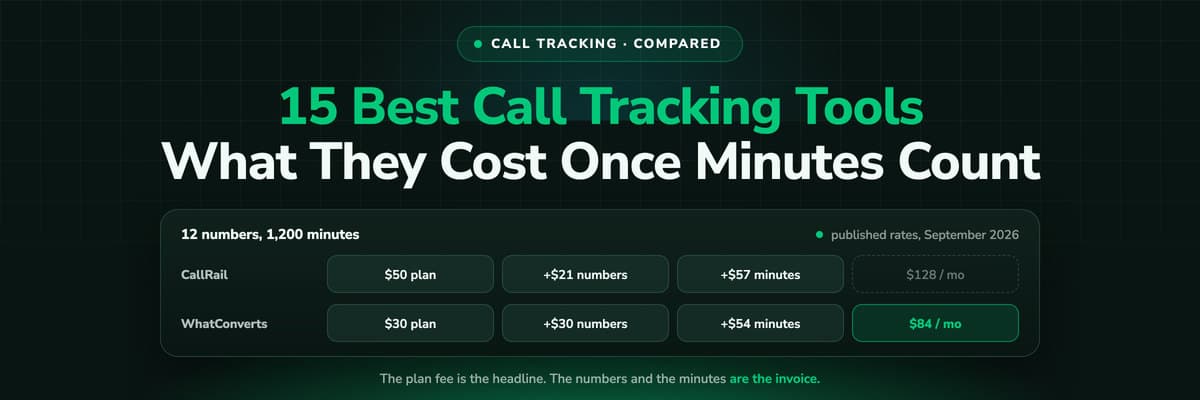
Three lines make up every invoice in this category: the plan fee, the numbers and the minutes. The plan fee is the number on the pricing page and the one everybody compares. The other two are what changes between January and June.
Here is the same modest setup priced on the published rates of three tools, read on 16 September 2026: 12 local tracking numbers and 1,200 local minutes a month, which is a single-location business with a real number pool and a busy phone.
12 local numbers and 1,200 local minutes, on published rates, September 2026
| Tool | Plan | Numbers | Minutes | Monthly total |
|---|---|---|---|---|
| CallRail Lead Tracking | $50 (5 numbers, 250 minutes included) | 7 extra at $3 = $21 | 950 extra at $0.06 = $57 | $128 |
| WhatConverts Call Tracking | $30 ($30 usage credit) | 12 at $2.50 = $30 | 1,200 at $0.045 = $54 | $84 |
| CallScaler Pro | $45 | 12 at $0.50 = $6 | 1,200 at $0.045 = $54 | $105 |
| Nimbata Pro | $35 | Per answered call, rate not published | Per answered call, rate not published | $35 plus usage |
Read the allowance, not the headline
CallRail's $50 plan is the cheapest headline of the four and the most expensive result of the three that can be calculated, because 250 minutes runs out on day nine. WhatConverts wins this particular basket because its usage credit covers most of the numbers. Change the basket to 40 numbers and 300 minutes and the order changes with it.
LeadJourney sits outside that table on purpose, because the plan fee is not buying a call tracker. The platform is priced on tracked marketing spend, from 129 euros a month up to 5,000 euros of spend and 249 up to 15,000, and call tracking is an add-on at 50 euros a month for five numbers and 250 minutes, recording and transcripts included, with every extra European number at 5 euros. The basket above is 132.50 euros of add-on (50 for the bundle, 35 for seven more numbers, 47.50 for 950 more minutes) on an account that is already reporting every click, form, organic visit and CRM deal. Compared with a call tracker it is more; compared with a call tracker plus an attribution tool it is one bill. See pricing for the ladder.
How to Choose, by What Your Business Looks Like
One location, calls are the lead
CallRail, or Nimbata if the volume is low and the calls are long. Add fixed numbers for the Business Profile and any print before you touch the website pool.
Paid ads are what produce the calls
The question is not which tool reports calls, it is which one sends the qualified ones back. LeadJourney, or a call tracker plus the work of wiring conversions yourself.
An agency reporting to clients
WhatConverts for lead-source reporting, CallScaler when the number count is what hurts, CTM when clients need white label and routing.
A sales team answering the phone
CTM, because routing, coaching and a softphone are worth more to you than another attribution column. Invoca at contact centre scale.
You buy or sell calls
Ringba or Retreaver. These are routing and bidding engines, and marketing attribution is not what they are for.
Call tracking is part of your product
Twilio, and budget for the pool logic, the session join and the reporting, which is most of the work.
Whichever you pick, the decision that matters more than the tool is what you count. Sending every ring back to the ad platform teaches it to buy wrong numbers. Decide what a qualified call is, then send only those. How to track phone calls back to the ad walks through that in detail, and call tracking is the plain definition if you are new to the category.
FAQ
Frequently Asked Questions
What buyers ask before choosing call tracking software.
What is the best call tracking software in 2026?
For a business whose calls come from paid ads, LeadJourney, because the call lands on the same journey as the click, the form and the CRM deal and a qualified call goes back to Google Ads and Meta automatically. For a standalone call tracker, CallRail. For agencies reporting lead sources, WhatConverts. For inbound sales teams and HIPAA, CTM. The right answer depends on what happens after the phone rings, not on the feature grid.
How much does call tracking software cost?
Published entry prices in September 2026 run from $30 a month (WhatConverts) to $50 (CallRail), $79 (CTM), £249 (Infinity) and £299 (Ruler Analytics), plus usage. Budget for three lines, not one: the plan fee, roughly $0.50 to $5 per tracking number a month, and roughly 4 to 6 cents per local minute. Invoca, Phonexa and Marchex publish no price at all.
Is there free call tracking software?
Google Ads call reporting is free and tracks calls from your Google ads and, with the phone snippet, calls to the number on your website. It sees nothing outside Google Ads, records nothing and writes nothing to your CRM. Nimbata publishes a $0 plan that charges usage only. Everything else in the category is paid.
Does call tracking hurt my local SEO?
Not when it is set up properly. Dynamic number insertion swaps the number in the browser while your real number stays in the page source, the schema markup and every citation, so the name, address and phone number a crawler reads does not change. What does cause damage is hard-coding a tracking number into your site, your Business Profile or your directory listings. The detail is in call tracking and SEO.
How many tracking numbers do I need?
Size the pool on visitors at the same time, not on visitors a month. Each concurrent visitor holds one number for the length of their visit, so a site with a handful of sessions at once needs a handful of numbers, and a busy one needs dozens. Fixed numbers are separate: one each for the Business Profile, print, radio and vehicles, and they never need a pool.
Can call tracking send calls to Google Ads and Meta as conversions?
Yes, and it is the part that varies most. CallRail reports calls as conversions in Google Ads natively and supports Facebook offline events. Google's own call reporting counts calls in Google Ads only. LeadJourney sends a qualified call to both Google Ads and Meta through their conversion APIs with the click ID the call inherited, so the bidding trains on calls that became jobs rather than on every ring.
Keep reading
More from the blog
 Tool Comparisons
Hyros vs Cometly (2026): Which Attribution Tool Fits?
Hyros is built around high-ticket sales, info products and calls; Cometly around B2B SaaS pipeline. Both quote prices on a call. A fair, dated comparison of tracking, CRM depth, AI, security and cost, and who should pick which.Read the article14 min read Tool Comparisons
Hyros vs AnyTrack (2026): Which Tracker at Your Size?
AnyTrack is a self-serve conversion router with a free plan and public prices from $100 a month. Hyros is a done-for-you attribution platform quoted on a call. A fair, dated comparison of tracking, attribution, affiliates, calls and cost.Read the article14 min read Tool Comparisons
Triple Whale vs Northbeam (2026): Which Fits Your Store
Triple Whale and Northbeam both measure e-commerce marketing, and they are built for different stores. Attribution, measurement, AI, setup and both price lists side by side, read on 25 October 2026, and which brand each one fits.Read the article13 min read
Call tracking software
Find out which ads make your phone ring, and which calls become jobs
LeadJourney gives every call its source, its recording and its place in the journey, and sends the qualified ones back to Google and Meta. Book a demo on your own numbers, with a 30-day money-back guarantee.
30-day money-back guaranteeSetup with a tracking expert


