Skip to content

BlogHow To Guides

Salesforce Campaign Influence: How It Works, Pros and Cons

Campaign Influence shares an opportunity's amount between the campaigns on the record. Here is how it works, what the models do to a real deal, what it needs from your team, and where it stops.

Salesforce Campaign Influence explained: how the models split an opportunity between campaigns
Contents
  1. In short
  2. What it does
  3. The two records
  4. The two versions
  5. The models
  6. Auto-association
  7. Account Engagement
  8. The strengths
  9. The limits
  10. Is it enough?
  11. How to enable it
  12. Best practice
  13. What to add underneath
  14. Further reading
Summarise this article with AI

Opens the page with a ready prompt in:

Nothing is sent until you pick a service.

Campaign Influence is the attribution that ships with Sales Cloud. It answers one question well: of the campaigns this opportunity's contacts touched, which ones should get credit for the amount, and in what proportion. It is free with the licence you already have, it reports inside Salesforce, and for teams running events, webinars, nurture and outbound as Salesforce Campaigns it is a genuinely useful model.

It is also widely misunderstood, usually in one of two directions. Some teams believe it does nothing, because they never enabled the customizable version and every opportunity credits a single Primary Campaign Source. Others expect it to be a full marketing attribution platform and are surprised when paid search spend, organic traffic and the anonymous first click are nowhere in the report.

This guide explains what Campaign Influence actually does: the two records it depends on, the difference between Primary Campaign Source and Customizable Campaign Influence, what each model does to a real opportunity, how to switch it on, what it is good at, and the point at which most teams add a measurement layer underneath it.

In Short: What Campaign Influence Is

In short

Salesforce Campaign Influence shares an opportunity's amount between the campaigns its contacts are members of. Primary Campaign Source gives one campaign 100% of the credit; Customizable Campaign Influence spreads it across several using a predefined model, or percentages you set yourself. It depends on two records existing: the Campaign Member and the Opportunity Contact Role. It is available in Professional, Enterprise, Performance, Unlimited and Developer editions, it reports natively in Salesforce, and it credits only what is represented as a Salesforce Campaign.

What Salesforce Campaign Influence Does

Campaign Influence links Campaigns to Opportunities and assigns each linked campaign a share of the opportunity's amount. That share is what turns a campaign from an activity into a number: instead of reporting that a webinar had 240 registrations, you can report that it is credited with a proportion of a pipeline figure, and roll that up across every campaign in the quarter.

Salesforce stores this on the Campaign Influence object, one record per campaign and opportunity pair, carrying the model it belongs to and the revenue share it holds. Because those are ordinary records, everything downstream is ordinary Salesforce work: reports, dashboards, list views and formula fields all behave the way your team already expects.

How It Works: The Two Records Everything Depends On

Campaign Influence does not observe behaviour. It reads relationships that already exist in the org, and there are exactly two of them.

  • The Campaign MemberA Lead or Contact has to be a member of the campaign. That is the record saying this person was reached by this campaign, and it is created by a marketing tool, an import, an automation or a person.
  • The Opportunity Contact RoleThat Contact has to be attached to the Opportunity as a Contact Role. It is the link between the person marketing reached and the deal sales is working, and it is the one most orgs are missing.

Why the Contact Role matters more than anything else

No Contact Roles, no influence. If reps close opportunities without attaching the people involved, Campaign Influence has nothing to join and the report will look empty however carefully the models are configured. Fixing that with a required field, a flow or a validation rule is usually the single highest return change a Salesforce admin can make here.

Primary Campaign Source vs Customizable Campaign Influence

This is the distinction behind most of the confusion. Every Opportunity has a Primary Campaign Source field, which points at one campaign and gives it the whole amount. Customizable Campaign Influence is the version that shares the amount across several campaigns, and it has to be switched on in Setup.

The two ways Salesforce credits a campaign

If your pipeline reporting still shows exactly one campaign per opportunity, this is almost certainly why. The fix is a setup change rather than a purchase.
The Models, and What They Do to a Real Opportunity

Customizable Campaign Influence ships with straightforward models: first touch, last touch and an even split. You can also write your own influence percentages, manually or through automation, which is how teams build weighted models when they want them.

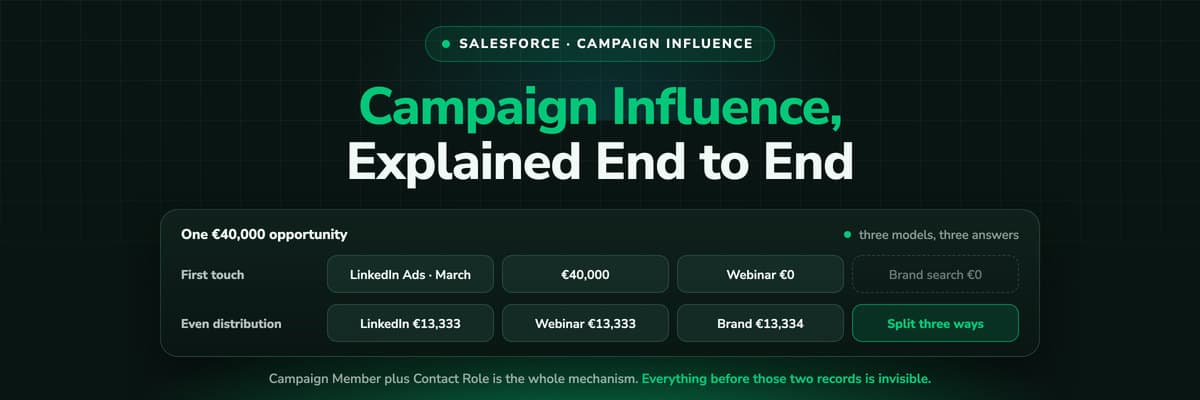
The clearest way to see the difference is to put one deal through all three. Take a €40,000 opportunity whose contacts touched three campaigns: a LinkedIn Ads campaign in March, a webinar in April, and a branded Google Ads campaign in June, days before the deal was signed.

One €40,000 opportunity, three models

None of these is the true answer, and that is the point of having several. First touch flatters demand generation, last touch flatters the campaigns closest to the signature, and an even split flatters whichever team runs the most campaigns. Reading two of them side by side is more honest than arguing about which single one is correct.

Auto-Association and the Time Frame

Attaching campaigns to opportunities by hand does not survive contact with a real pipeline, so Salesforce can add them automatically. Auto-association creates the influence record when a campaign meets the rules you set, and the most consequential of those rules is the time frame: how far back before the opportunity was created a campaign membership still counts.

There is no correct number here, only a number that matches your sales cycle. Too short and the campaigns that opened the relationship fall out of every report, which quietly defunds top of funnel work. Too long and campaigns get credit for deals they had nothing to do with. Teams with a six month cycle usually end up somewhere near a year, and then adjust once they have seen a few quarters of reports.

Where Account Engagement and the Marketing Products Come In

Campaign Influence is Sales Cloud. Salesforce also sells marketing products, and they add attribution of their own: Account Engagement, formerly Pardot, carries the B2B Marketing Analytics dashboards with weighted multi-touch models, and the marketing platform has added multi-touch attribution dashboards of its own. So it is not true that Salesforce has no multi-touch attribution. It has several, in different products, licensed separately.

What they share is their input. Every one of them attributes what has been represented inside Salesforce as a campaign, a member or an activity. That is a boundary rather than a flaw, and knowing where it runs makes the rest of this article, and any buying decision, much simpler.

What Campaign Influence Is Good At

  • It costs nothing extra. The feature is in the editions most B2B orgs already run, so the only investment is configuration time.
  • It reports natively. Campaign Influence records behave like any other object, so your existing dashboards, sharing rules and exports all work.
  • It credits offline work properly. Events, webinars, conferences and outbound sequences are first class here, which is more than most web analytics tools can say.
  • It is flexible where it matters. Predefined models cover the common cases, and custom percentages let an operations team encode a model the business actually agreed on.
  • It aligns two teams around one record. When the campaign credit sits on the opportunity sales is working, marketing and sales are reading the same number rather than two exports.
  • It scales with the CRM. No separate data model to maintain, no second system of record, no reconciliation meeting.

Where Campaign Influence Runs Out

None of these are bugs. They follow from what the feature is: a model over records that already exist in Salesforce.

  • It starts at the record, not at the clickInfluence begins with a Campaign Member. The ad click, the organic session and the pricing page visit that happened before anyone filled in a form were never records, so they cannot be credited.
  • It only knows what is a CampaignSearch, direct, referral, review sites and AI assistants have no campaign to join. Unless somebody creates and maintains a campaign to represent them, they are invisible to the model.
  • Campaign Cost is typed in by handNo spend is pulled from Meta, Google, LinkedIn or Microsoft. Without live cost there is no ROAS and no cost per closed deal, only revenue divided between campaigns.
  • It depends on human diligenceContact Roles have to be attached, campaign memberships have to be current and the time frame has to suit the cycle. The report degrades quietly when any of that slips.
  • Nothing leaves SalesforceThe credit stays in the report. Closing a deal changes nothing in any ad account, so the platforms keep optimising toward the events they can see, which are usually form fills.

When Campaign Influence Is Enough, and When It Is Not

It is usually enough when

  • Most of your pipeline comes from events, webinars, outbound and partnerships, all of which are naturally Salesforce Campaigns.
  • You have an admin or operations person who keeps Contact Roles and campaign membership honest.
  • Budget decisions are made quarterly, at the level of programmes rather than individual ads.
  • The question you are answering is which campaigns influenced revenue, not what a lead cost.

It stops being enough when

  • A meaningful share of pipeline starts with a paid click, because that click is not in the model at all.
  • Somebody asks what a closed deal cost, which needs spend joined to the pipeline rather than a manual cost field.
  • Your reports keep showing Direct, Other or a blank source for deals you know came from advertising.
  • You want the ad platforms to learn from your outcomes, which requires sending the closed deal back out.

How to Enable Campaign Influence

  1. In Setup, find Campaign Influence and enable Customizable Campaign Influence. Until this is on, every opportunity has exactly one Primary Campaign Source.
  2. Choose the model or models you want available, and decide whether influence percentages will be set by a model, by automation or by hand.
  3. Configure auto-association, including the time frame that decides how far back a campaign membership counts before the opportunity was created.
  4. Make sure Opportunity Contact Roles are actually being created. A flow, a required step in the sales process or a validation rule is what keeps this true six months from now.
  5. Add the Campaign Influence related list to the Opportunity page layout so the credit is visible on the record, not only in a report.
  6. Build the reports: campaigns with influenced opportunities, influence by model, and a dashboard your marketing and sales leads both look at.

Test the model before you announce it

Run one closed won deal you know the history of through the report and check whether the split matches what actually happened. If it does not, the problem is nearly always missing Contact Roles or a time frame that is too short, and both are fixable before anyone loses trust in the number.

Getting More Out of It: A Short Checklist

  • Name campaigns to a convention that survives a year, because the report is only as readable as the names in it.
  • Keep campaign hierarchies shallow, and use the parent campaign for the programme rather than for every asset in it.
  • Fill in Campaign Cost, even roughly, or half of the ROI questions cannot be answered at all.
  • Attach Contact Roles at the point the opportunity is created rather than at the end, when nobody remembers who was involved.
  • Review the time frame once a quarter against your actual average sales cycle.
  • Report two models side by side, so nobody has to defend a single model as the truth.
  • Record offline touches as campaign memberships if they matter, because a conference conversation that closed a deal deserves to exist in the data.
  • Decide who owns the model. Attribution without an owner drifts back to whatever the last admin configured.

What Teams Add Underneath It

Most teams that outgrow Campaign Influence do not replace it. They keep it for the campaigns they run inside Salesforce, and they add a measurement layer in front of the CRM to cover what the model cannot observe: the sessions before the record existed, the click IDs, and the spend.

That is what LeadJourney does. Every visit is tracked server-side on your own domain before a Lead exists, the anonymous first click is stitched to the Lead when the form is submitted, and first and last touch are written onto the Lead, the Contact and the Opportunity as fields your existing Salesforce reports can use. Spend is pulled from Meta, Google, LinkedIn and Microsoft Ads, so cost per closed deal becomes a live number rather than a manual one, and when the opportunity is marked Closed Won the amount goes back to the platform that produced it as an offline conversion.

The two layers answer different questions and both are worth having. Campaign Influence answers which of our campaigns influenced this revenue. A measurement layer answers where this revenue came from in the first place, and what it cost to buy. If you want the longer comparison, we ranked twelve attribution tools for Salesforce, and the Salesforce integration page lists exactly which fields get written.

Further Reading

FAQ

Frequently Asked Questions

The questions Salesforce admins and marketers ask about Campaign Influence.

What is the difference between Campaign Influence and Primary Campaign Source?

Primary Campaign Source is a single field on the Opportunity pointing at one campaign, which then carries the full amount. Campaign Influence, in its customizable form, creates a record per campaign and opportunity pair and shares the amount between them according to a model. If your reports show one campaign per deal, Customizable Campaign Influence has probably not been enabled.

Which attribution models does Salesforce Campaign Influence support?

Customizable Campaign Influence ships with straightforward predefined models covering first touch, last touch and an even split, and it also lets you enter influence percentages yourself, manually or through automation. Weighted multi-touch models such as U shaped and W shaped come from Salesforce's marketing products, Account Engagement and the marketing analytics line, rather than from Sales Cloud.

Why is my Campaign Influence report empty?

Nine times out of ten it is Opportunity Contact Roles. Influence joins a campaign to an opportunity through the contacts on that opportunity, so if reps close deals without attaching contacts, there is nothing to join. The other two causes are Customizable Campaign Influence not being enabled, and an auto-association time frame shorter than your sales cycle.

Does Campaign Influence track website visits and ad clicks?

No. It works from Campaign Members and Contact Roles, both of which are records created after somebody is known. Anonymous sessions, ad clicks and organic visits before the form submission are not part of the model, which is why teams that buy traffic usually add a tracking layer that captures the click and writes it onto the record.

Which Salesforce editions include Customizable Campaign Influence?

Salesforce documents it as available in Professional, Enterprise, Performance, Unlimited and Developer editions, in both Lightning Experience and Salesforce Classic. It is a setup change rather than an additional purchase, which is what makes it worth configuring properly before evaluating anything else.

How far back should the campaign influence time frame go?

As far as your average sales cycle, and no further. The time frame decides how long before an opportunity's creation a campaign membership still counts. Too short and early stage programmes disappear from every report; too long and campaigns collect credit for deals they never touched. Review it once a quarter against real cycle length.

Can Campaign Influence tell me what a deal cost?

Only if somebody keeps Campaign Cost up to date by hand, because no spend is pulled from the ad platforms. That is why cost per closed deal and ROAS are usually the first questions that push a team to add a layer that connects live ad spend to the pipeline the CRM already holds.

Salesforce attribution

Campaign Influence, with the click in front of it

Track every session server-side, write the real first touch onto the Lead and the Opportunity, join live ad spend, and send Closed Won back to the platforms. Live in 21 minutes.

LeadJourney dashboard showing lead sources, campaign performance and attributed revenue side by side